Every Piano Player Mode Explained, Which View Should You Use?
Beginner, Sheet Music, Bars Sheet, Simple Sheet, Lead Sheet, Fall Down, Kid Simple and Kid Bar, what each mode shows, who it's for, and how to switch.
The same song looks completely different depending on the mode you pick. That's the point, different people learn piano in different ways, and forcing a beginner to read engraved sheet music is the fastest way to make them quit. Super Simple Piano gives you eight viewing modes that all play the same audio, so you can find the one that matches how *your* brain works.
This guide walks through every mode with real screenshots, what each one is good for, the tools you get along the way (Chord Keys, Metronome, Practice, L / R / All, BPM, Song Key), and a few songs you can try in each.
Where to switch modes
Open any song. In the top-left of the player you'll see the View dropdown, click it and the full list opens. You can flip between modes at any time, even mid-playback. Your choice is remembered for the next song you open, so once you find a mode you like, you'll keep landing in it.
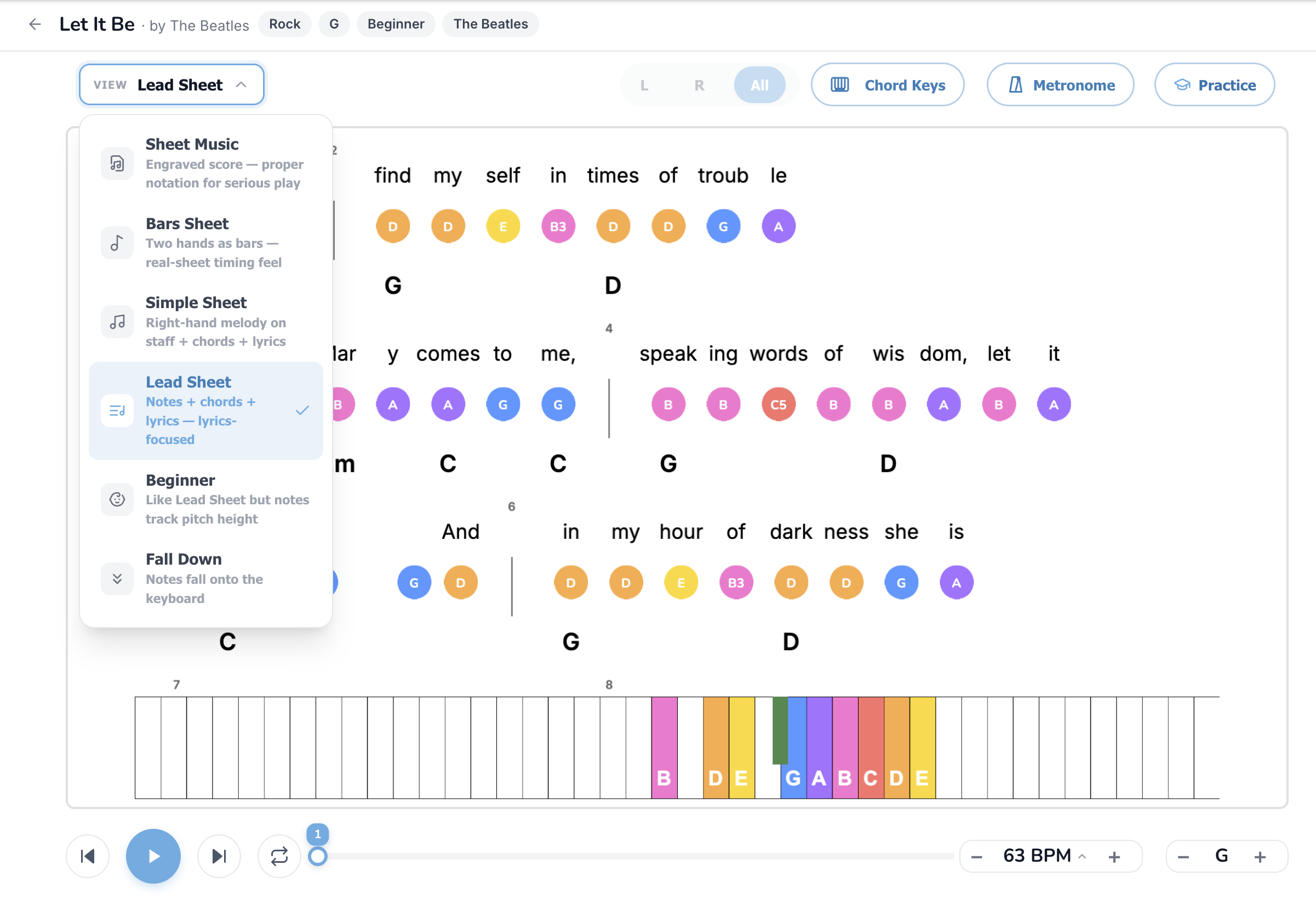
The pill controls on the right (L / R / All, Chord Keys, Metronome, Practice) appear in most modes:
Now the eight modes, in roughly the order most people grow through them.
---
1. Beginner, the easiest way to play a song
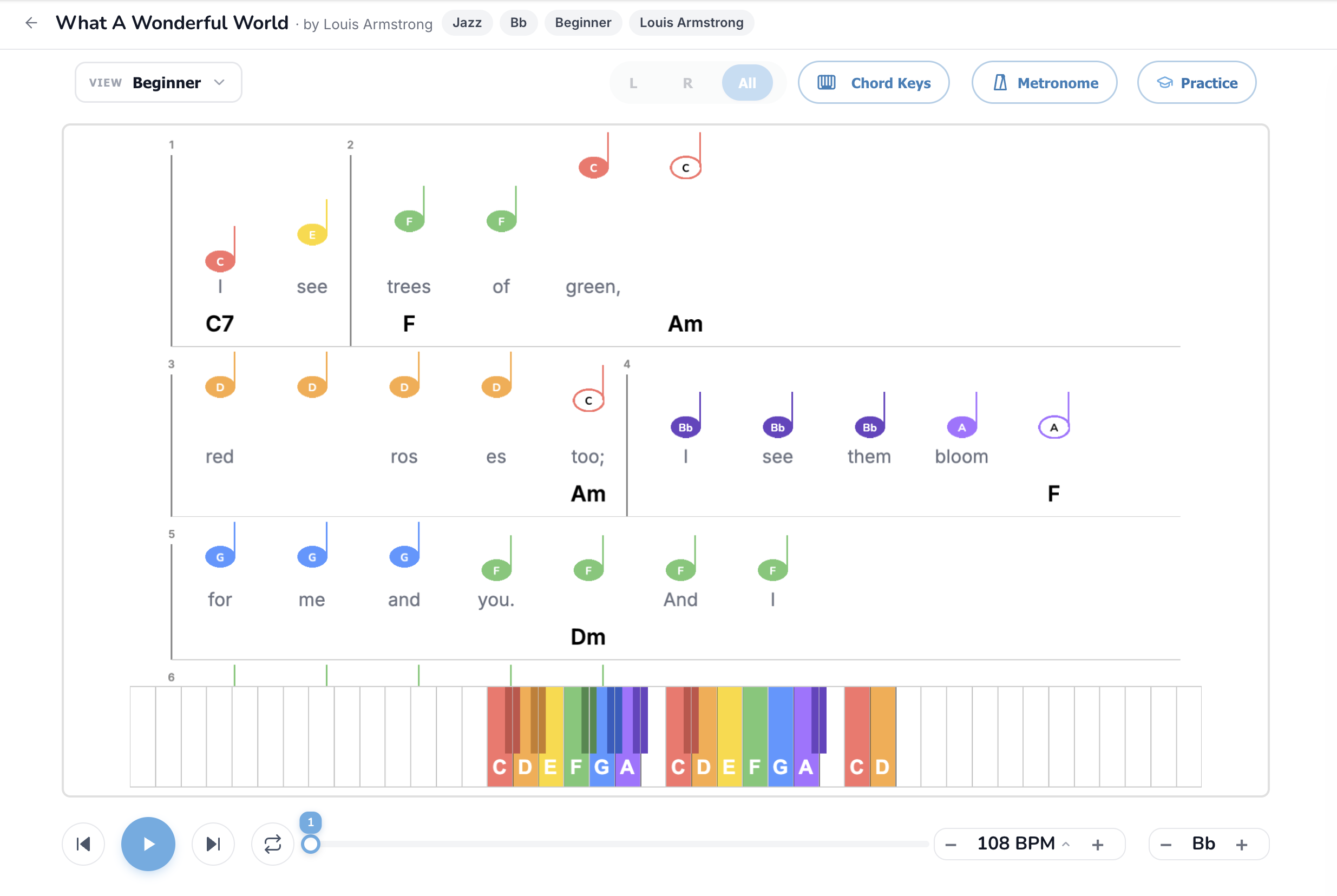
Who it's for: Absolute beginners who want to play a real song *today*. If you've never touched a keyboard, start here.
What you see: Right-hand melody only, each note drawn as a big colored dot with the letter name (C, D, E, F…) inside. Lyrics sit directly under every note so you sing what you play. Chord symbols (C7, F, Am, Dm…) appear under each bar, those are the left-hand chords if you want to add them, or what a guitarist friend can strum along to.
Why it works: No staff to decode, no rhythm notation to parse, the colors match the colored keys on the on-screen piano at the bottom, so it's literally "press the color you see." You learn the melody and the lyrics together, which is how songs stick in your memory in the first place.
Tools that matter most here: L / R / All isn't very useful (only the right hand is shown). Chord Keys is on by default, leave it on. Practice mode in Beginner is a great way to start grading yourself: connect a MIDI keyboard and the player waits at every note until you press the right key.
Read the full Beginner mode guide →
Try it:
---
2. Sheet Music, the real engraved score
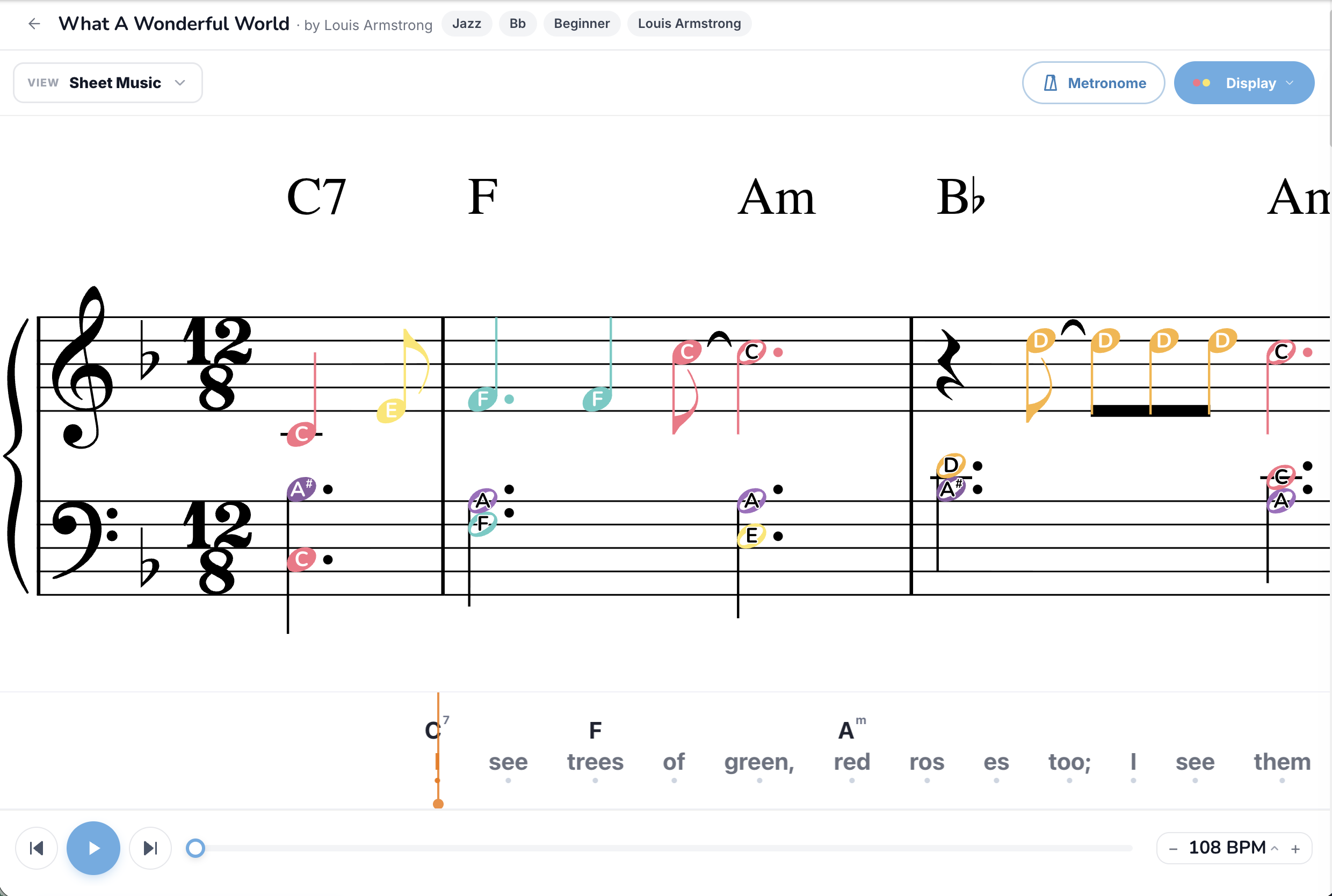
Who it's for: Players who already read traditional notation, or want to start. This is the same kind of two-stave engraved score you'd buy at a music store, rendered server-side by Verovio so it always looks publisher-grade.
What you see: Grand-staff notation (treble + bass clef), full rhythm values, time signatures, dynamics, articulation marks, lyrics under the melody line, and chord symbols above the staff. The note heads can be colored (toggle via the Display button in the top-right) so beginners can still cross-reference colors back to keys while they learn to read.
Why it works: Once you can read notation, you can play any song from any songbook, not just the ones with simplified visualizers. Sheet Music is the bridge from "I play Super Simple Piano songs" to "I play piano."
Tools that matter most here: Display toggles the colored note heads on/off, turn them off as your reading improves. Metronome is essential when you're sight-reading. BPM at 70-80% is the gold standard for sight-reading practice.
Note: Sheet Music is only available on songs that have a publisher-quality MusicXML source uploaded. Most catalog songs do; YouTube-converted and user-uploaded songs don't.
Read the full Sheet Music mode guide →
Try it:
---
3. Bars Sheet, gamified, no rhythm reading required
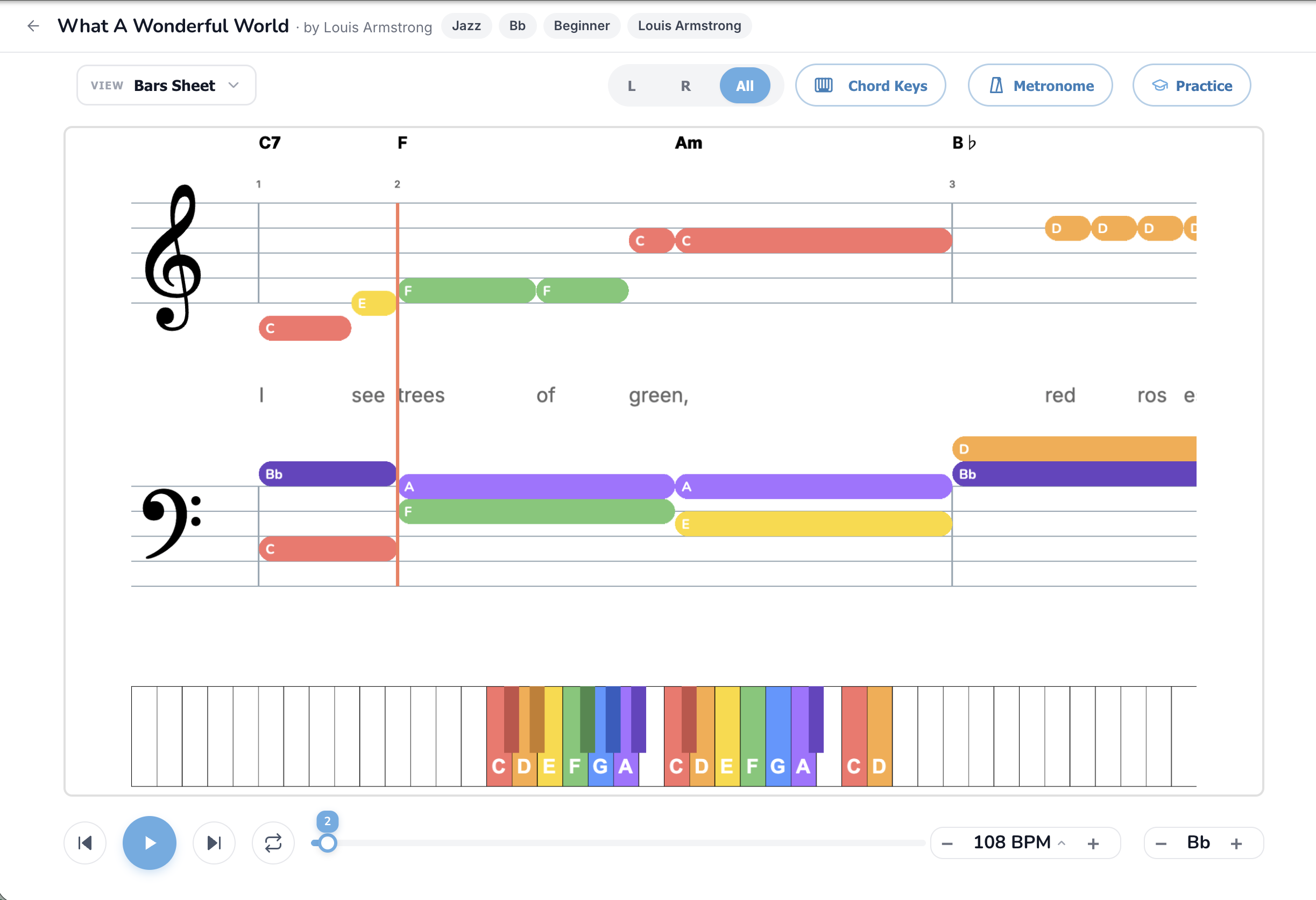
Who it's for: Players who can find notes on the keyboard but get tripped up by traditional rhythm notation (quarter notes vs. eighth notes vs. dotted halves…). Also great for kids and visual learners.
What you see: Both hands as horizontal colored bars on a simplified staff. The length of each bar is how long you hold the note, no quarter/half/eighth note math required. A red playhead sweeps left-to-right; play each bar when the playhead reaches it. Lyrics sit between the staves, chord symbols sit above.
Why it works: Rhythm is the single hardest part of reading sheet music. Bars Sheet replaces "this is a dotted-eighth tied to a sixteenth" with "this bar is twice as long as that one", your eyes do the timing for you. You'll be playing songs in 10 minutes that would take weeks to decode in standard notation.
Tools that matter most here: L / R / All lets you drill one hand at a time. Chord Keys for the left-hand shortcut. Metronome + a slow BPM if you struggle to lock onto the playhead.
Read the full Bars Sheet mode guide →
Try it:
---
4. Simple Sheet, sheet music, melody only
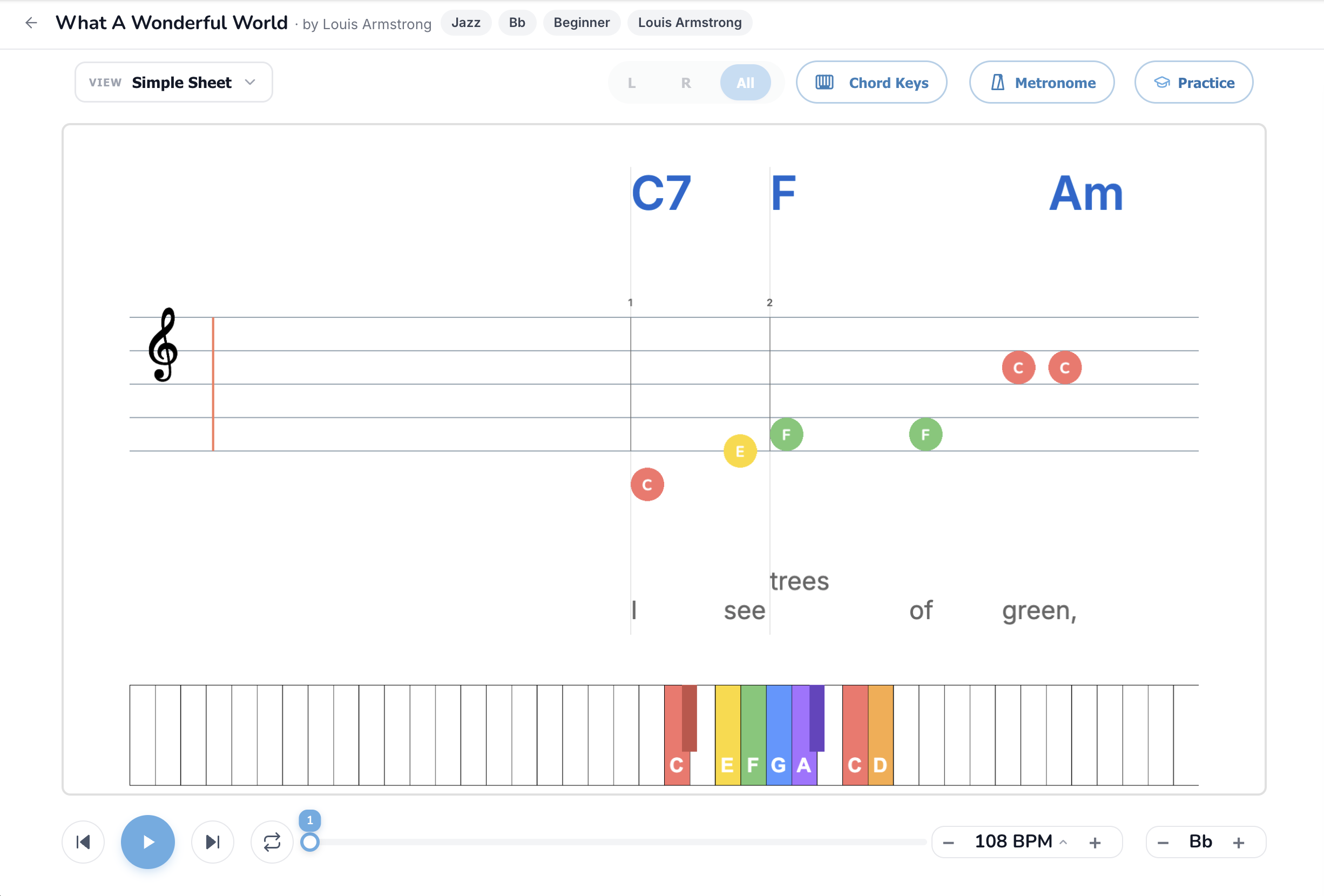
Who it's for: Players who *want* to read real notation but aren't ready for grand-staff two-hand sheet music yet. Also: anyone who only cares about playing the melody (vocalists, ukulele players, beginners adding piano).
What you see: A single treble-clef stave with just the right-hand melody, colored note heads, lyrics under the melody line, and chord symbols above for the left hand (or for the guitarist next to you).
Why it works: It's the on-ramp to standard sheet music, same notation, half the cognitive load. Most people who get stuck on full Sheet Music can play in Simple Sheet within a day. Once you're comfortable, jumping to two-hand Sheet Music feels much smaller.
Tools that matter most here: Chord Keys is the killer feature, chord names above the stave mean you can fake a full arrangement with just the melody and basic block chords. Practice mode here is the cleanest way to grade your sight-reading.
Read the full Simple Sheet mode guide →
Try it:
---
5. Lead Sheet, for singers and chord players
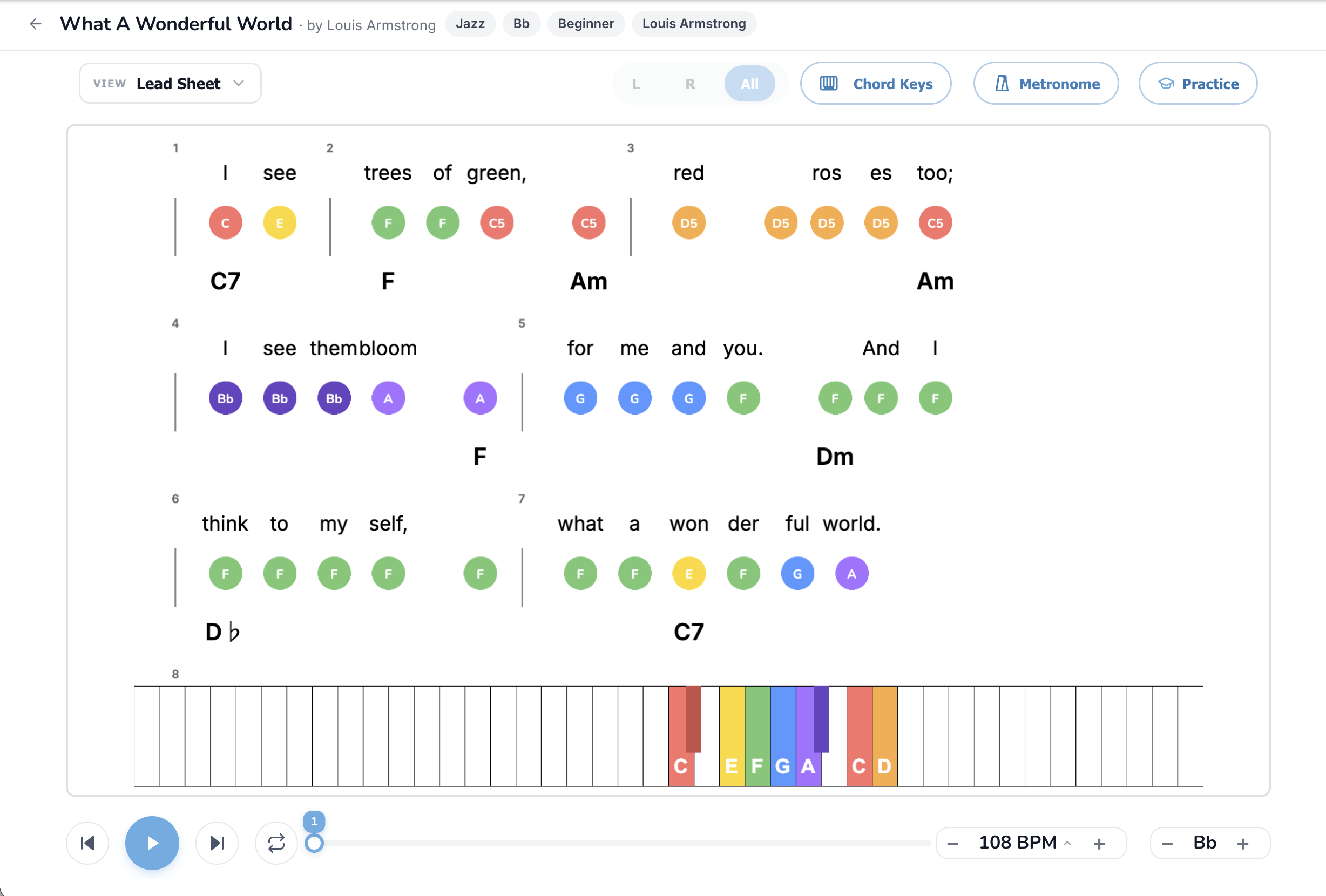
Who it's for: Vocalists who play piano just to accompany themselves. Jam-session players who want chords + melody on one page. Anyone who thinks of songs as "the tune + the chords."
What you see: Lyrics on top, colored melody-note dots above each syllable, chord names below each chord change. No staff, no rhythm notation, no left-hand part, just the three things a singer-pianist actually needs: what to sing, what melody note to play, and what chord to vamp.
Why it works: It's the format every working pop musician actually uses, fake books, Real Books, church song sheets, busker chord-charts are all variations on the lead sheet. If you've ever Googled "song-name chords," you've used a lead sheet. Ours adds the melody dots on top so you don't have to know the tune by ear.
Tools that matter most here: Chord Keys is always on (the chord labels *are* the mode). Song Key transposer is crucial, bump the key up or down a few semitones until the melody sits where your voice is comfortable.
Read the full Lead Sheet mode guide →
Try it:
---
6. Fall Down, Synthesia-style falling notes
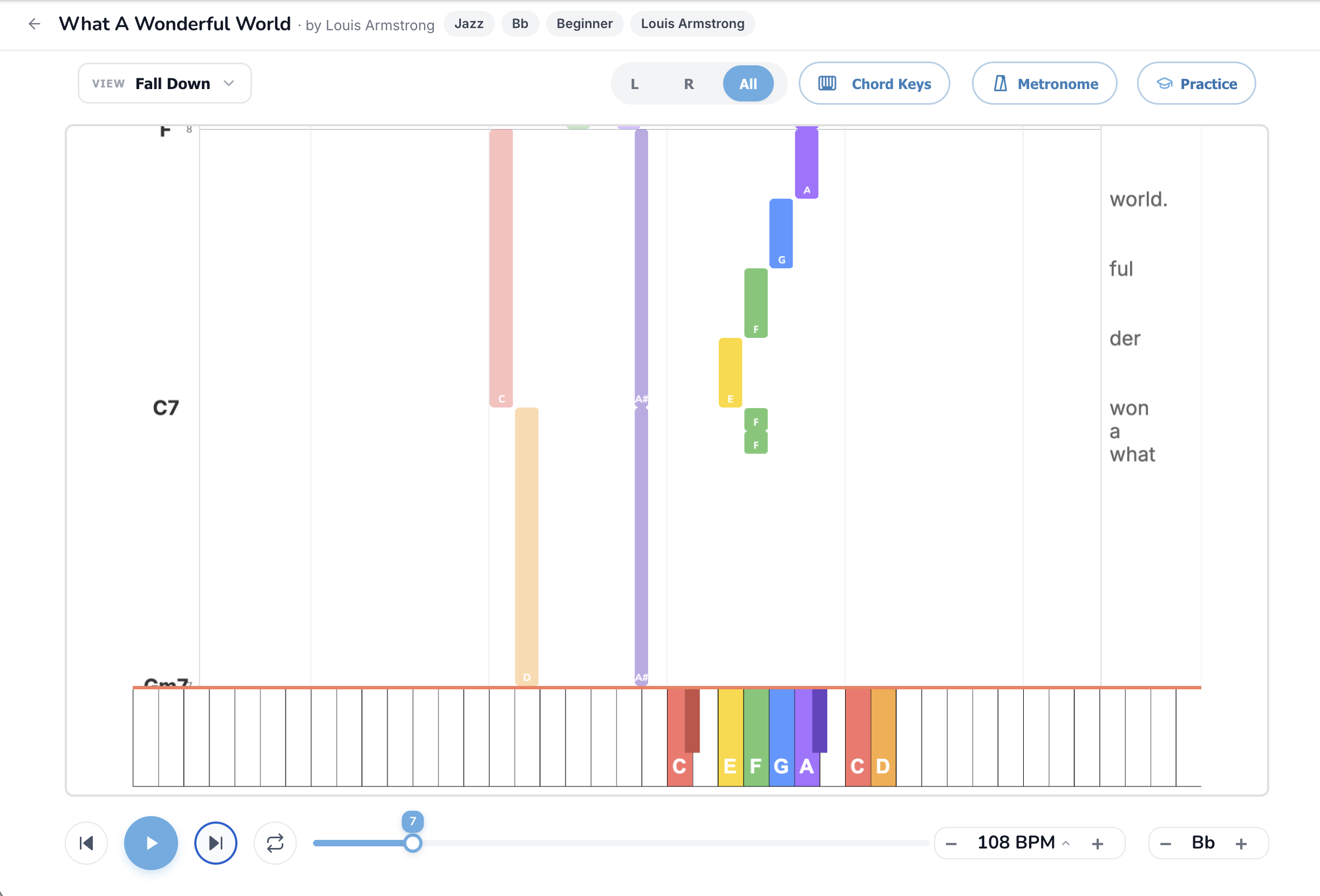
Who it's for: Anyone who can't read music *at all* but loves those YouTube piano cover videos where notes rain down onto a keyboard. Visual learners. Kids. People who learned piano from games like Rocksmith or Guitar Hero.
What you see: A blank space at the top where colored note-bars fall vertically toward the on-screen keyboard. When a bar touches a key, that's when you play it. Bar length equals note duration. Chord symbols appear on the left edge so you can still grab the chord with your left hand. Lyrics scroll on the right.
Why it works: Zero notation knowledge required. Your eyes track *where* the bar is going to land (which key) and *how long* it is (how long to hold). This is the most popular learning style for kids and self-taught adults, it's how millions of people learn from YouTube tutorials.
Tools that matter most here: L / R / All to drill one hand. BPM at 50-70% when you're learning a new section. Practice mode pauses the falling notes until you play the right key, turn it on for any song that's faster than you can react to.
Read the full Fall Down mode guide →
Try it:
---
7. Kid Simple, for the youngest players
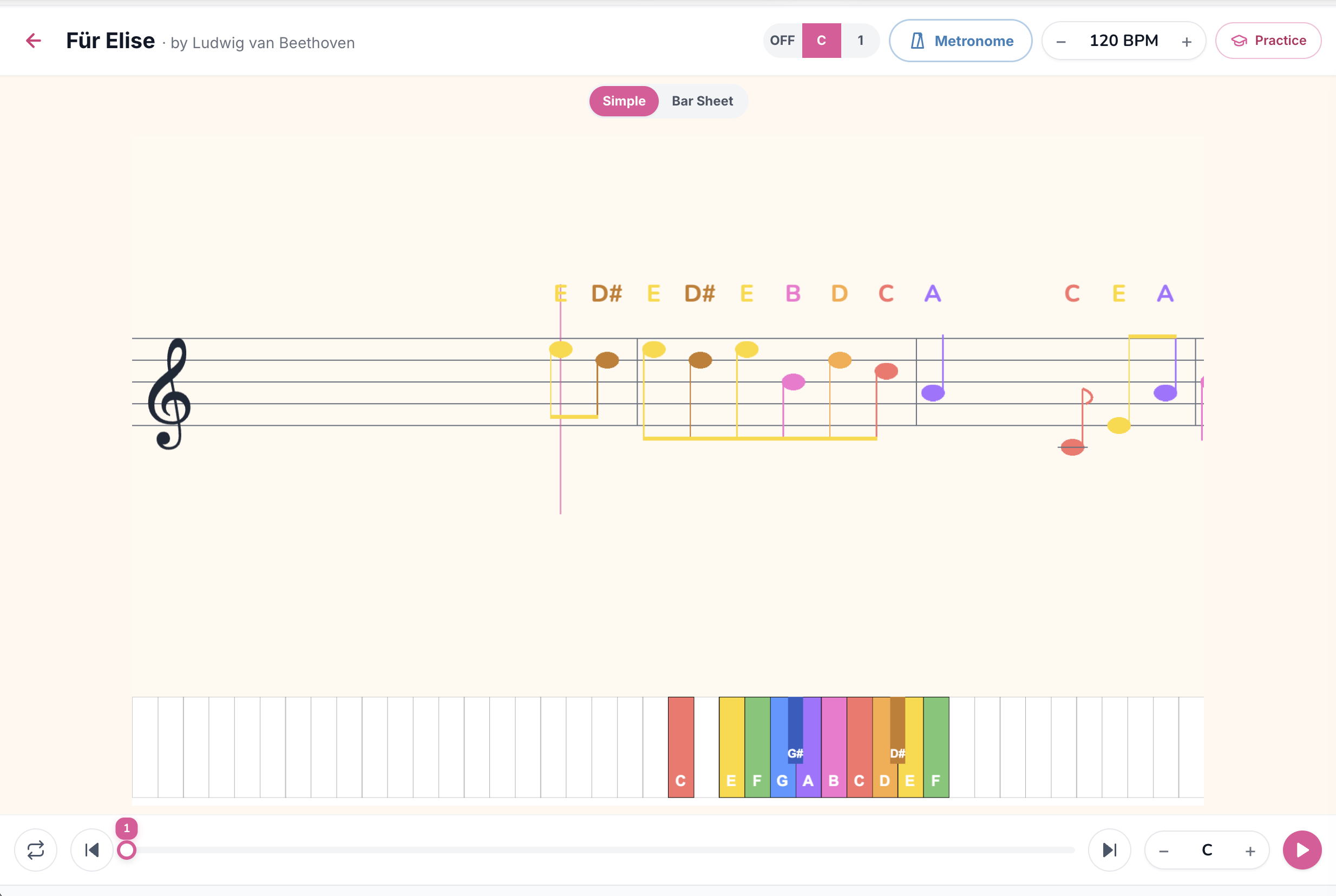
Who it's for: Kids age 4-9 who can't yet read sheet music but want to play their favorite songs. Parents teaching piano at home. Music teachers running group lessons for very young students.
What you see: A simplified treble staff with the melody only, drawn at child-friendly sizes. Each note is labeled above with its letter name (E, D#, B, A…) so the child doesn't need to decode the staff yet. The on-screen keyboard at the bottom is bigger, more colorful, and only shows the few octaves the song actually uses.
Why it works: Kids learn to associate the *position on the staff* with the *letter name* with the *colored key* all at once, that's the foundation for real music reading later, but without the frustration of "what note is that?" stopping them every two seconds.
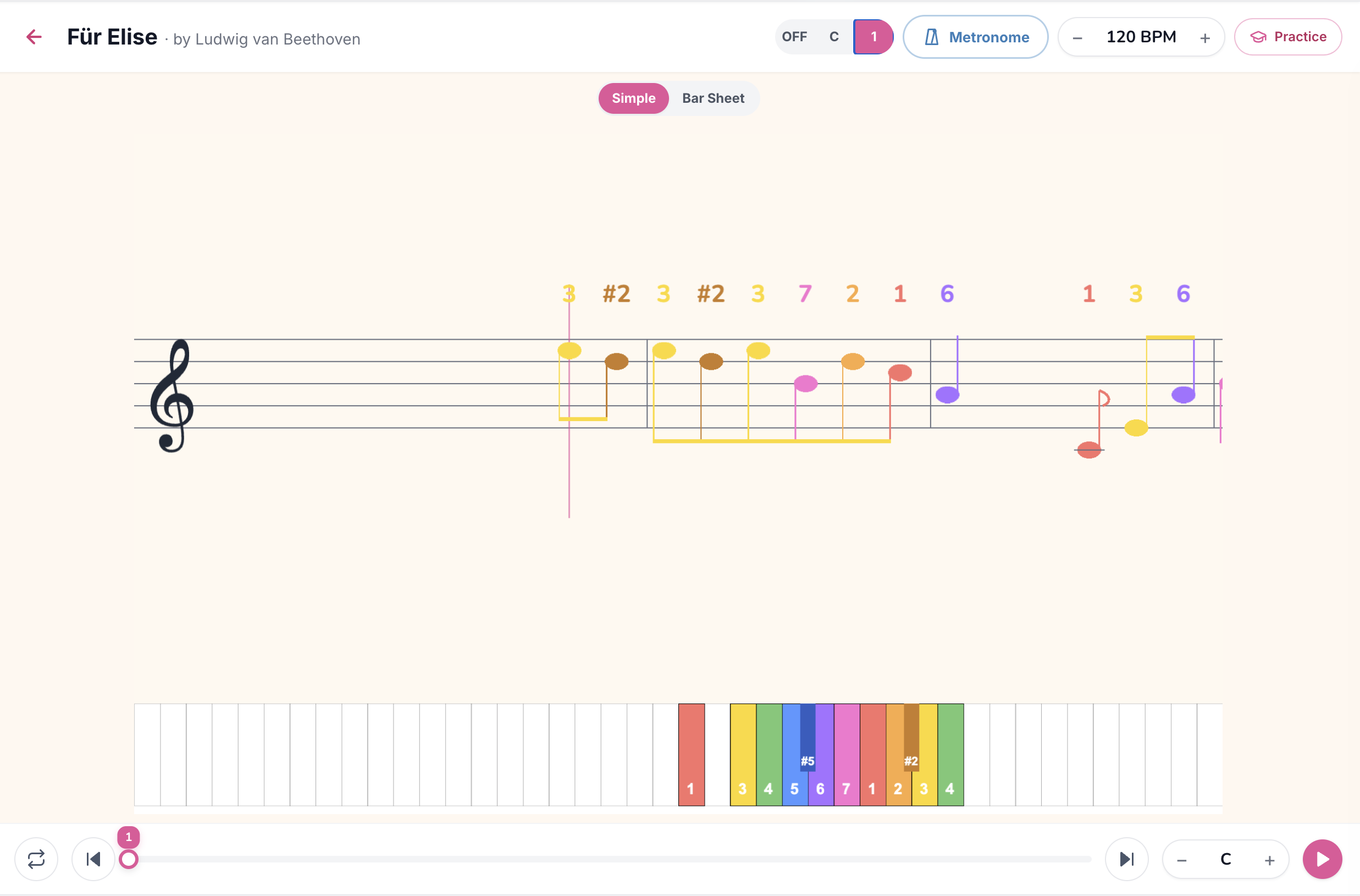
Kid Simple has two label modes, toggle the C / 1 switch in the top-right:
Number mode is wonderful for very young kids and for any approach based on the Suzuki method or solfège, the relationships between notes become obvious in a way that letter names hide.
Tools that matter most here: Metronome to build steady timing early. BPM way down (50-60% is fine) for the first run-throughs. Practice mode with a MIDI keyboard turns this into a game.
Read the full Kid Simple mode guide →
Try it (open these in Kid Mode):
---
8. Kid Bar, Bars Sheet, simplified for kids
Who it's for: Kids who've outgrown Kid Simple and want to feel the rhythm of songs, but aren't ready for two-hand bar sheets or grand-staff notation yet.
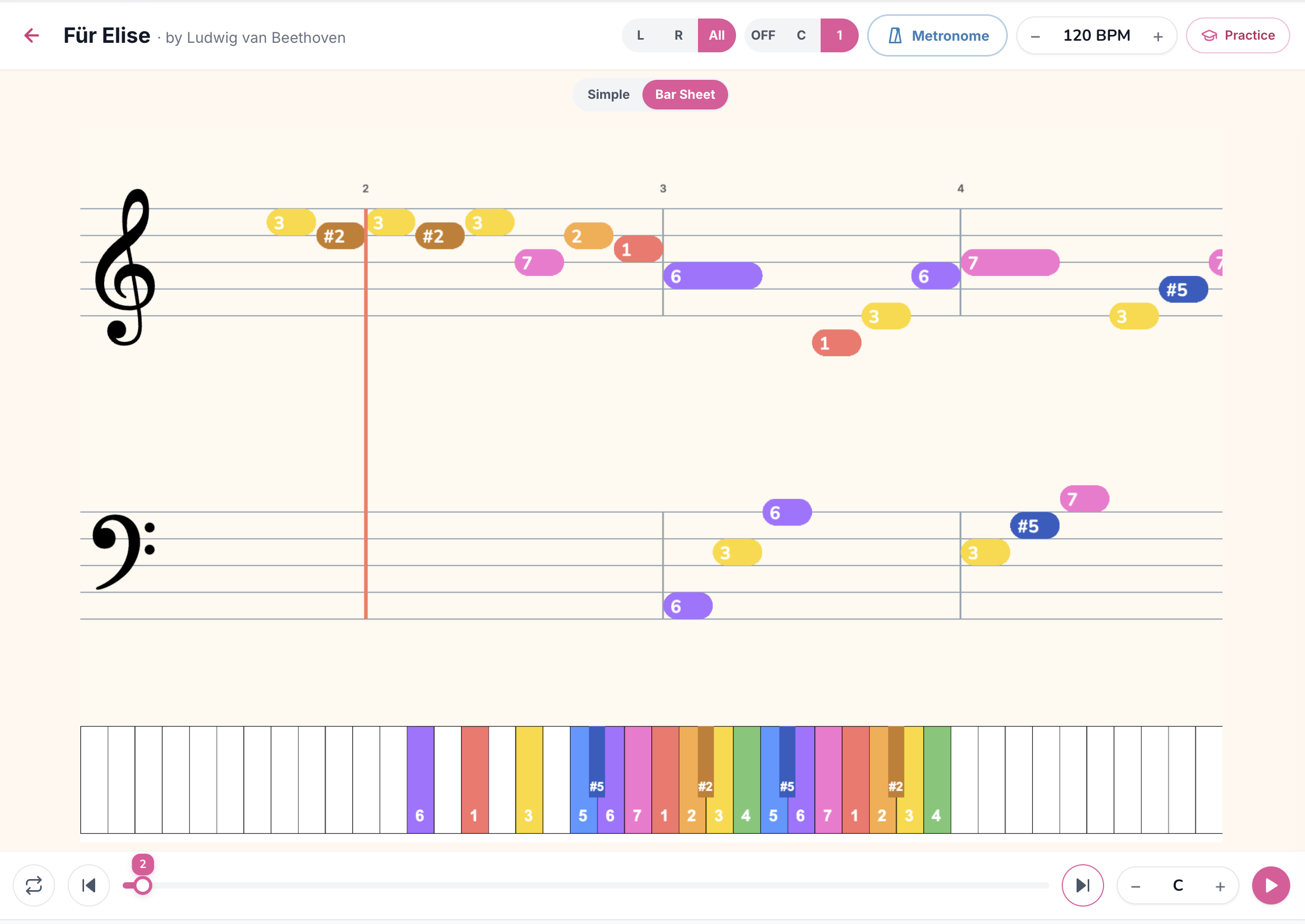
What you see: Same gamified bars as the adult Bars Sheet mode, but at child-friendly sizes, with labels printed inside every bar and the bigger kid-style keyboard at the bottom. Both hands are shown, but the visual is simpler, no chord symbols cluttering things up, fewer staff lines, bigger colors.
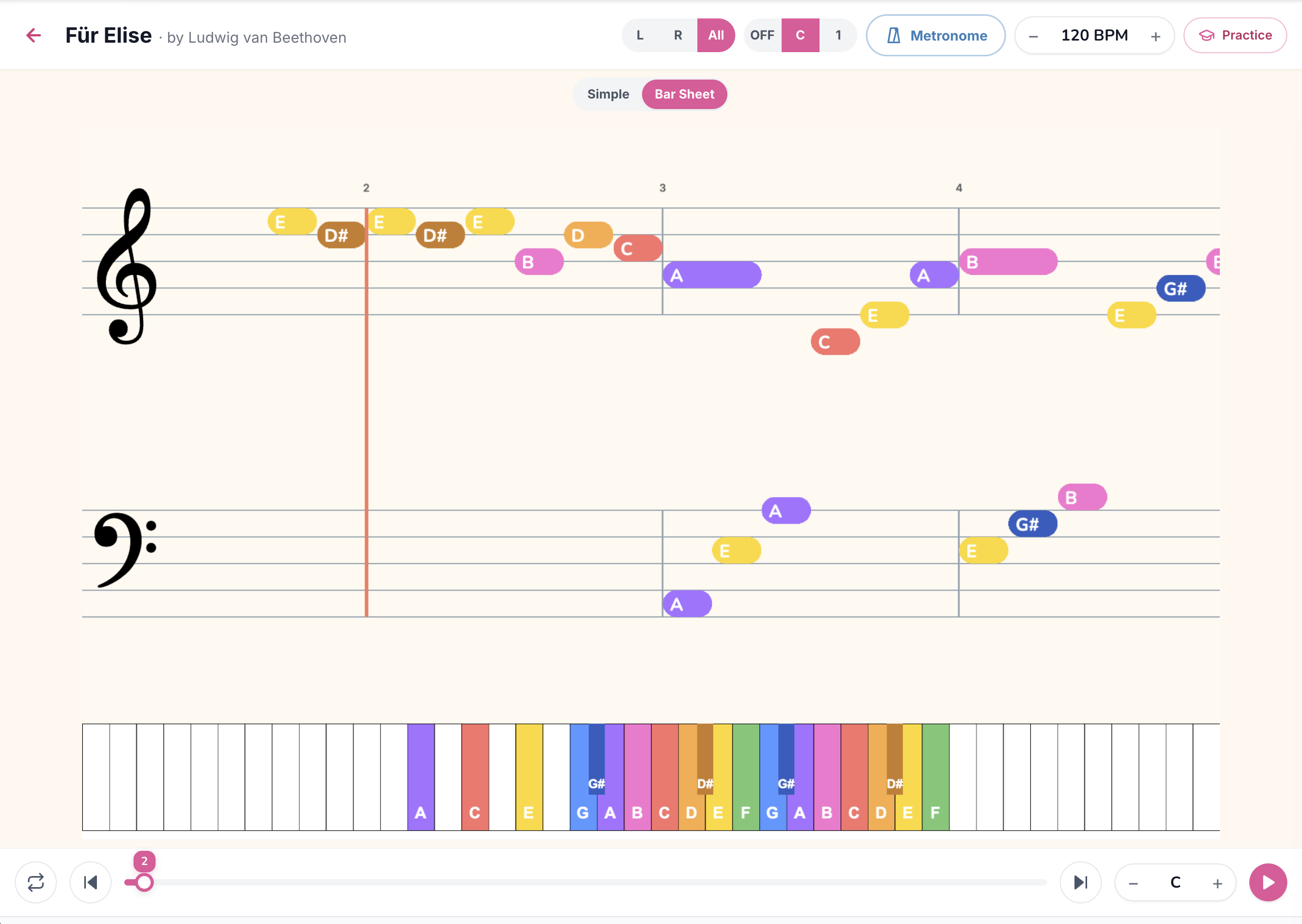
Just like Kid Simple, Kid Bar has both C and 1 label modes, toggle with the same top-right switch. Number labels (1, 2, 3…) work especially well in Bar mode because kids can see the melody contour rise and fall by the numbers, which is one of the earliest music-theory intuitions you can build.
Why it works: Kids who started with Kid Simple have built letter/number recognition, Kid Bar is the next step, teaching timing through the visual length of the bars. They learn rhythm before they learn rhythm *notation*, which is the right order.
Tools that matter most here: L / R / All to add the left hand once the right is solid. Metronome to internalize the pulse. BPM controls let parents/teachers slow things down for first attempts.
Read the full Kid Bar mode guide →
Try it (in Kid Mode):
---
Which mode should *I* use?
Quick decision tree:
You don't have to pick one mode for life. Most regular players settle into two or three, for example, Fall Down for new songs (to learn the notes), then Lead Sheet once it's in muscle memory (to sing along). Switch any time from the View dropdown; your last choice is remembered automatically.
---
What about the practice tools?
Every mode supports the same three deep-practice features:
And every mode has the same Song Key transposer in the bottom-right, bump any song into a key your voice or your skill level can handle.
---
Try a song now
Pick a mode that sounds like *you*, open one of the example songs above, and play through it once at 60% speed. You'll know in about three minutes whether the mode fits, and if it doesn't, the View dropdown is right there.
Ready to start playing?
Put it into practice with thousands of color-coded, slow-down-able songs, free in your browser.