Kid Bar Mode: Teaching Rhythm to Kids Before Rhythm Notation
Visual bar lengths replace quarter and eighth note math. How Kid Bar mode helps children feel rhythm naturally before they ever decode a time signature.
The hardest part of teaching a child to read sheet music isn't the notes, it's the rhythm. "This is a dotted quarter note, which equals 1.5 beats, which is half-again as long as a quarter note" is a sentence no six-year-old wants to hear. Kid Bar mode skips that conversation entirely. Notes become horizontal bars, length equals duration, and your child learns to feel rhythm through their eyes before they ever decode notation.
Kid Bar is the natural next step after Kid Simple mode. Same kid-friendly keyboard, same letter-or-number labels, same simplified visual, but now with both hands and length-based timing. It's the gentlest possible introduction to two-hand piano playing for children.
For the overview of all eight modes, see the player modes overview.
What your kid sees
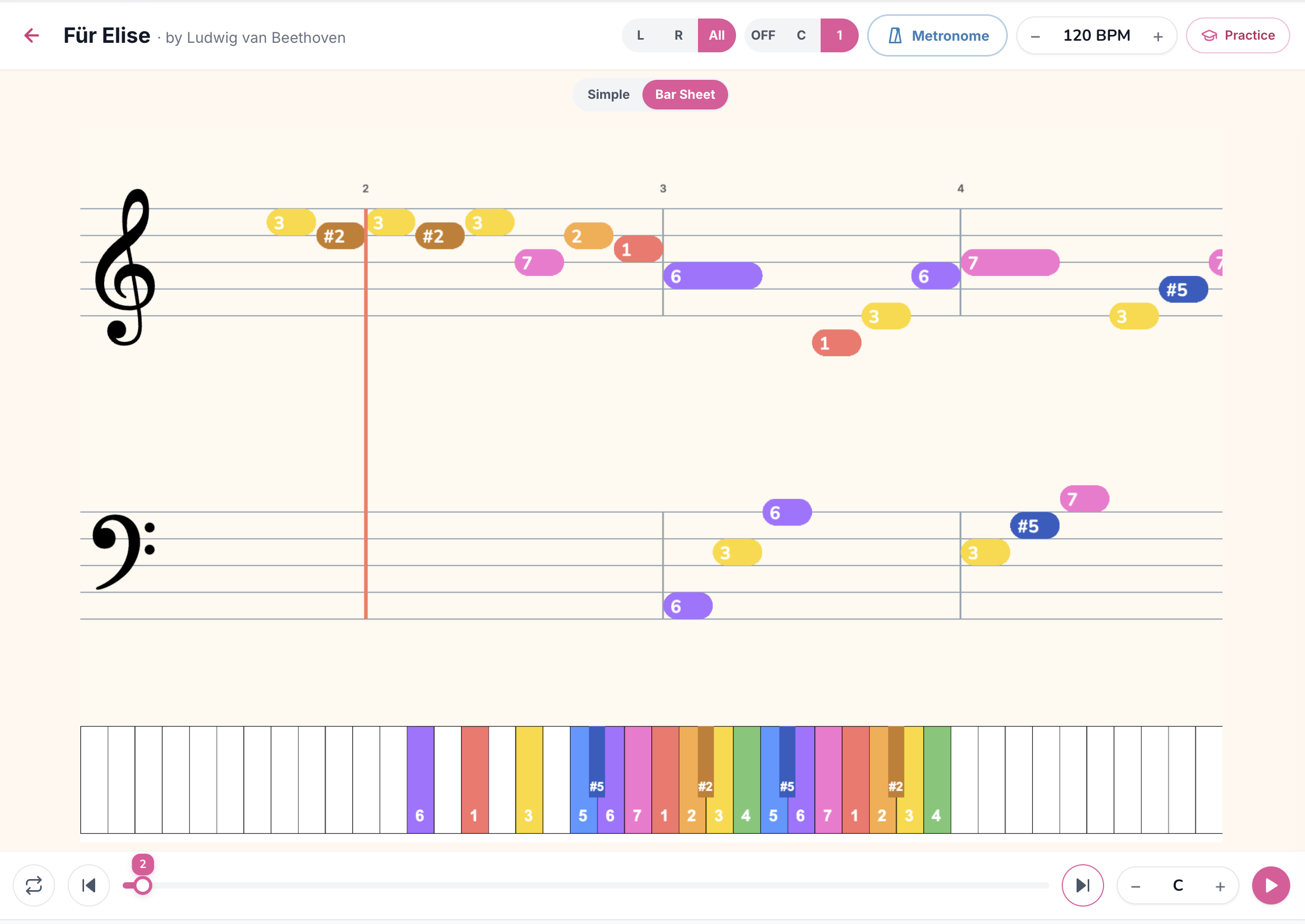
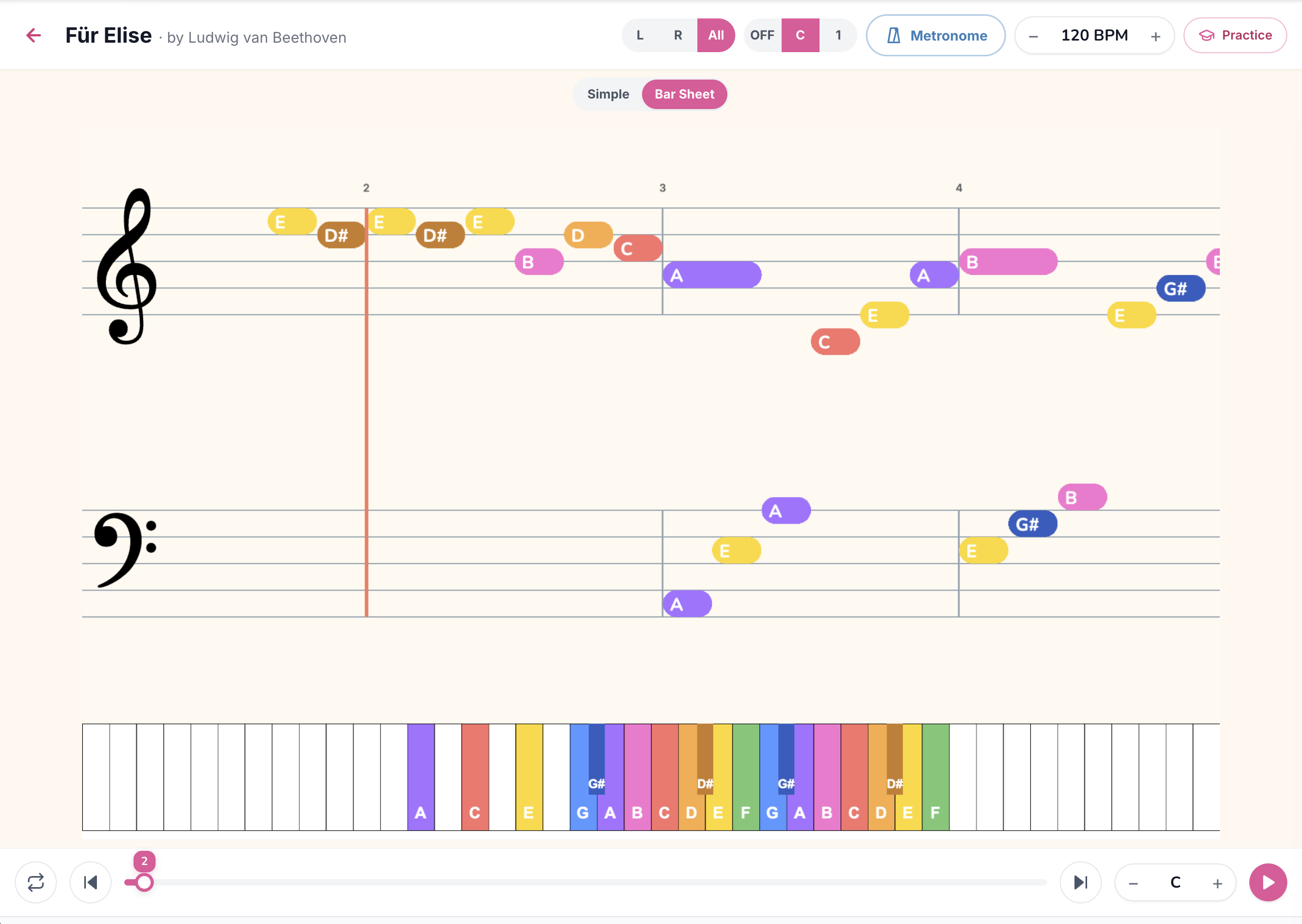
Two simplified staves stacked on top of each other (treble for the right hand, bass for the left hand), with colored bars instead of traditional note heads. Every bar is labelled with its note name so the child doesn't have to decode the staff position. A playhead sweeps left to right, and each bar gets played when the playhead reaches its left edge.
Specifically:
What they don't see (compared to the adult Bars Sheet mode):
The C vs 1 toggle
Kid Bar has the same letter-vs-number labelling toggle as Kid Simple.
C mode (letter labels)
Bars are labelled with note names: A, B, C, D#, F, etc. Best for kids who already know the alphabet and are ready to start associating piano keys with letters.
1 mode (number labels)
Bars are labelled with scale degrees: 1, 2, 3, 4, 5, 6, 7, plus sharps shown as #2, #5, etc. Best for very young kids and for any pedagogy based on Suzuki, Kodály, or solfège methods. Number mode makes melodic relationships obvious: "the melody jumps from 1 to 5, then steps down 5-4-3-2-1."
Number mode is especially powerful in Kid Bar because kids can visually see the melody contour rise and fall by numbers. The pattern "1-3-5, 1-3-5, 1-3-5" reading up the bars is itself a music theory lesson without anyone calling it that.
The Simple vs Bar Sheet toggle
The top centre of the Kid player has a switch between Simple and Bar Sheet. Kid Simple shows melody only, no rhythm bars. Kid Bar (this mode) shows both hands with rhythm bars. The toggle is sized for a child to use independently, encouraging exploration.
Most kids follow this progression naturally:
The full feature set
L / R / All pill
Essential in Kid Bar mode. Drill the right hand alone first (R), then the left hand alone (L), then combine (All). Kids who try All from the start get frustrated, kids who do hands-separate first feel like geniuses when they finally combine.
Metronome
Optional. Some kids love the click, others find it distracting. Try once, follow the kid's preference.
Practice button
Live grading via MIDI keyboard or microphone. Kids love Waiting mode because the song pauses at every note until they press the right key, removing the pressure to "keep up" with the audio. Setup walkthrough in How to Practice with Your Real Piano.
BPM control
Critical. Start at 40-50% of original tempo on the first session. Build up only when the kid asks.
Song Key transposer
Useful for songs with awkward black-key patterns. Transpose to a key with fewer accidentals if the kid is struggling.
Loop button
Set a four-bar loop on a section the kid is learning. Repetition is how kids build muscle memory, and loop mode removes the friction of manually restarting.
Why "rhythm before notation" is the right order
The traditional piano-teaching approach is to introduce rhythm notation early (quarter notes, half notes, time signatures) alongside pitch reading. This is fine for adults but problematic for kids, because it asks them to learn two cognitive systems at once.
Kid Bar mode separates the two. Pitch is taught visually (where on the staff is the bar) and via label (what letter or number is inside). Rhythm is taught visually (how long is the bar). Neither requires decoding traditional notation.
What happens is that kids develop rhythmic intuition through their eyes and hands first. By the time they encounter "this is a quarter note" in a music class or formal lesson, they already feel what a quarter note is, they just learn the symbol name for something they already know how to play.
This mirrors how children learn spoken language: they speak fluently for years before they learn to read. Kid Bar applies the same principle to music.
How to use Kid Bar mode at home
Common mistakes parents make
Songs worth trying in Kid Bar mode
Browse the curated kid catalog for the full set. To open any of these in Kid Bar specifically, use `/kid/{songId}/barsheet`:
When your kid is ready to graduate
Two signs:
For the wide-angle view, read the player modes overview.
TL;DR
Kid Bar mode is the rhythm-on-ramp for kids: simplified two-stave layout, colored bars instead of notes, length = duration, kid-sized keyboard, letter or number labels via the C/1 toggle. Always drill hands separately first, then combine. Start at 40-50% BPM and build up only when the kid asks. The natural next step after Kid Simple mode, and the bridge to the adult Bars Sheet mode. Browse the kid catalog to start.
Ready to start playing?
Put it into practice with thousands of color-coded, slow-down-able songs, free in your browser.