Kid Simple Mode: How Kids Learn Piano Without Frustration
Bigger keyboard, letter or number labels, simplified staff. A parent's guide to using Kid Simple mode for at-home piano lessons with kids age 4 to 9.
Kid Simple mode is the only mode in Super Simple Piano that was designed from the ground up with five-year-olds in mind. Everything is bigger. The labels are friendlier. The keyboard at the bottom only shows the keys the song actually uses. The two visual switches (C labels vs 1 labels, Simple vs Bar Sheet) are kid-toggleable. And there's no clutter, no chord symbols, no rhythm notation to decode, no left hand to coordinate.
If you're a parent teaching piano at home, a music teacher running group lessons for young kids, or a self-taught child learning from a tablet, Kid Simple is the mode to start with. It's also the mode that lets kids fly through actual songs they recognise within the first session, instead of grinding through "Mary Had a Little Lamb" exercises for six weeks.
For the parent-friendly overview of all eight modes, see the player modes overview.
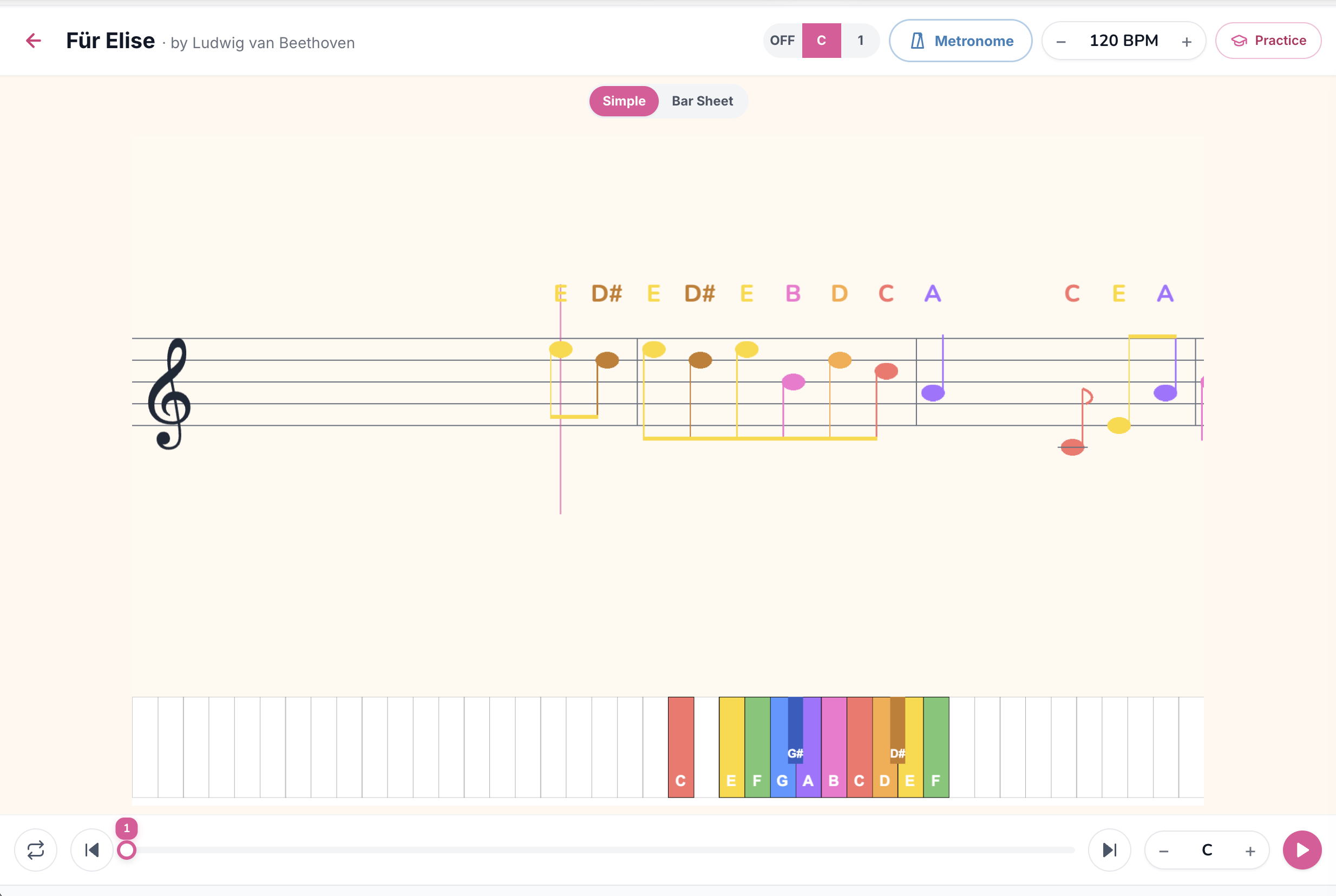
What your kid sees
A simplified version of a treble-clef stave, drawn at child-friendly sizes. Each note is labelled above with its letter name (E, D#, B, A…) so the child doesn't need to decode the staff yet. The on-screen keyboard at the bottom is larger and more colorful than in the adult modes, with only the keys this particular song uses highlighted, the rest are greyed out so the child isn't intimidated by 88 keys.
Specifically, your kid sees:
What they *don't* see:
The C vs 1 toggle (top right)
Kid Simple has a small toggle in the top-right corner that switches between two labelling systems:
C mode (letter labels)
Labels show note names: C, D, E, F, G, A, B, and their sharps (C#, D#, F#, G#, A#). This is the same system adults use, just printed larger above the notes.
Use C mode when: the child is older (7+), already knows the alphabet well, and you want them to start associating staff positions with letter names. C mode is the direct on-ramp to standard piano reading.
1 mode (scale-degree numbers)
Labels show scale degree numbers: 1, 2, 3, 4, 5, 6, 7, plus sharps shown as #2, #5, etc. The "1" is whatever the song's key is, in C major songs that's C, in G major songs that's G, and so on.
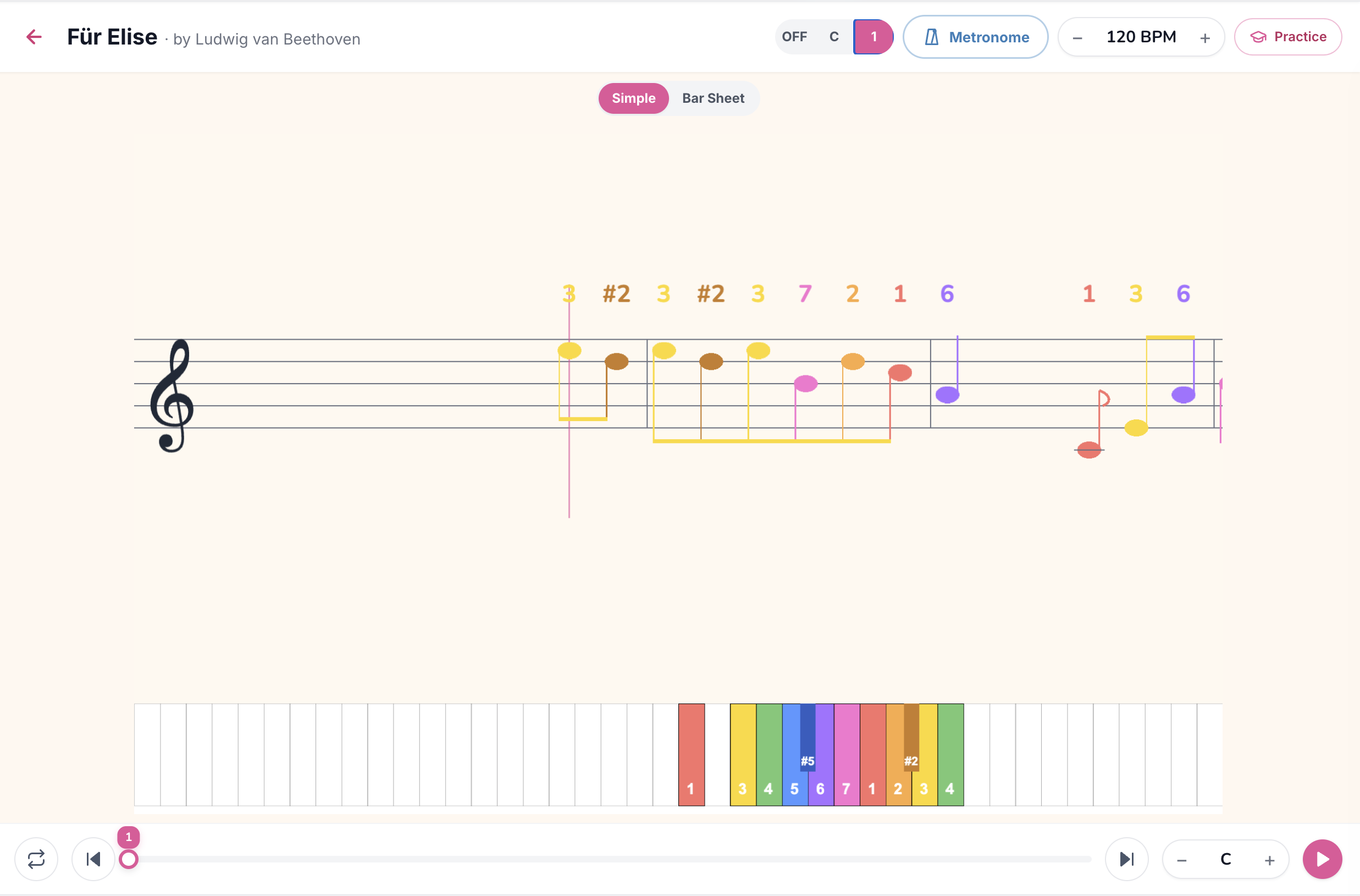
Use 1 mode when: the child is younger (4-7), still learning the alphabet, or when you want to teach musical relationships rather than letter memorization. Number mode is wonderful for any approach based on the Suzuki method, Kodály method, or solfège, because the relationships between notes (the melody goes 5-3-1, or jumps from 1 to 5) become obvious in a way that letter names hide.
Many parents and teachers start in 1 mode and switch to C mode once the child can hear how the numbers correspond to a relative position in the scale. Some never switch, the number system stays useful forever.
The Simple vs Bar Sheet toggle (top centre)
In Kid mode, the top centre of the player has a second toggle between Simple (this mode) and Bar Sheet (the kid version of Bars Sheet, covered in Kid Bar mode). The toggle is right where the child can see it, encouraging exploration.
The progression most kids follow:
The full feature set, button by button
Practice button
Connect a MIDI keyboard or use the microphone, and the player grades every note. For kids, Waiting mode is the killer feature: the song pauses at each note until they press the right key, so they can't "get ahead" of themselves and frustrate themselves trying to keep up.
Metronome
Use sparingly with kids. Click tracks can feel like pressure. Try it once, if the child doesn't like it, drop it.
BPM control
The most important button for kids. Default first run-throughs at 40-60% of original tempo. Build up only when the child *asks* for faster, never as homework.
Song Key transposer
Useful if a song has lots of black keys that are hard for small fingers to reach. Transpose to a key with fewer accidentals.
Loop and section repeat
Kids love loops. Set a four-bar loop on the chorus and let them play it ten times in a row. Each repetition is a tiny win, ten wins build huge confidence.
How to actually use Kid Simple mode with your child
Some parent-tested patterns:
Common mistakes parents make
Songs worth trying in Kid Simple mode
The catalog filters out genres that aren't kid-appropriate (jazz, R&B, hip-hop, country, YouTube covers, regional language pop). Browse the full kid catalog for the curated list. Some perennial favourites:
When your kid is ready to graduate
Two signals:
For a complete picture of how Kid Simple fits into the whole mode family, read the player modes overview.
TL;DR
Kid Simple mode is the mode for kids age 4 to 9: bigger keyboard, simplified staff, letter or number labels, no chord symbols or rhythm notation density. Toggle between C labels (letter names) and 1 labels (scale degrees) depending on the child's age and learning style. Keep sessions short, BPM slow, and let the child pick songs they love. Browse the kid catalog to start.
Ready to start playing?
Put it into practice with thousands of color-coded, slow-down-able songs, free in your browser.