Beginner Piano Mode: The Complete Guide to Playing Your First Song
Color-coded note dots, lyrics, chord labels, no sheet music reading required. A full walkthrough of Beginner mode and how to play a real song in under an hour.
Beginner mode is the entire reason people who think they "can't play piano" end up playing a real song in their first session. It strips piano down to two things your brain can handle on day one: the color of a dot and the letter inside it. Everything else is hidden until you're ready for it.
This is the deep-dive guide. If you want the 30-second pitch alongside seven other modes, read the player modes overview first.
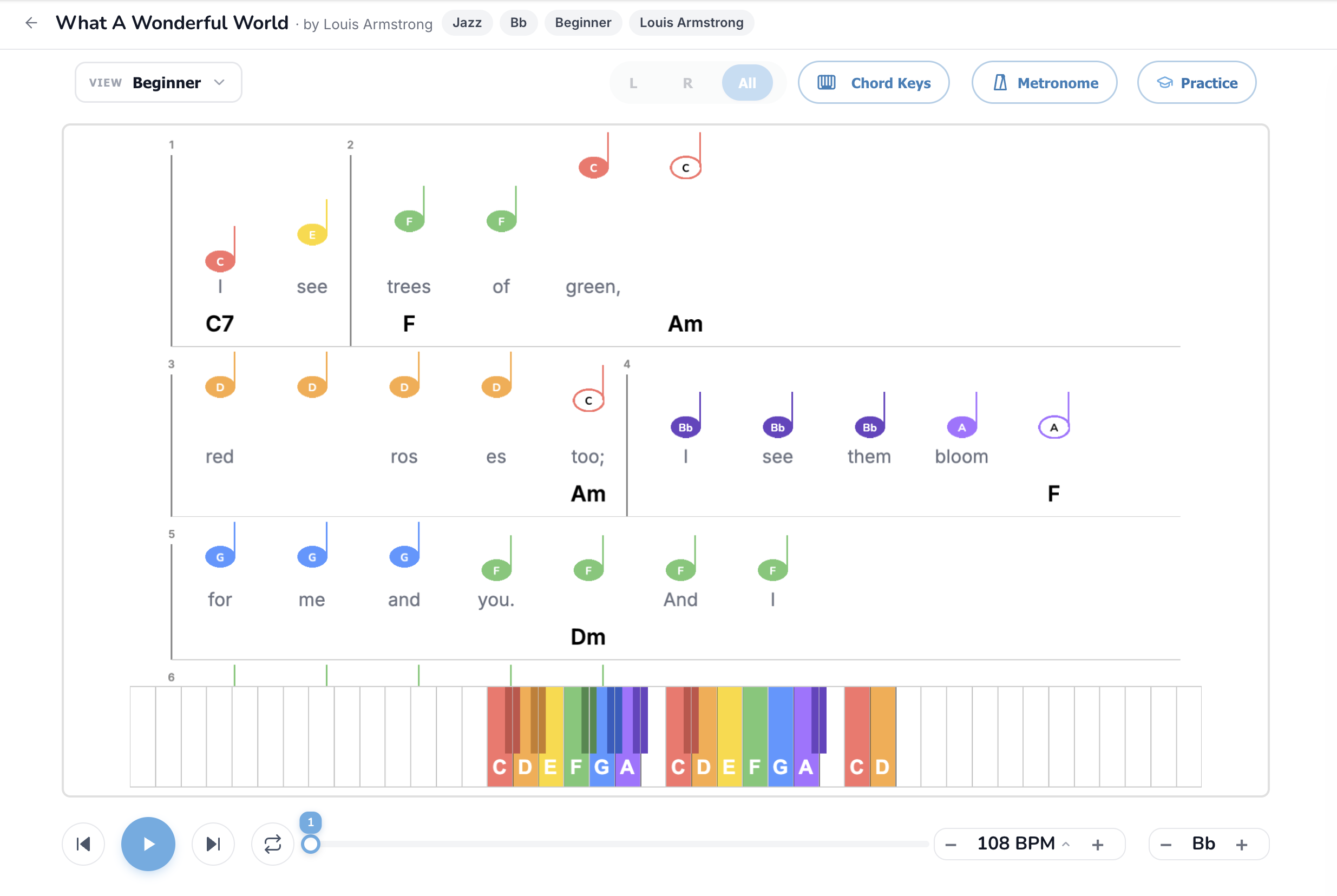
What you're actually looking at
Open any song in Beginner mode and four layers stack on top of each other:
The color scheme is consistent across every Super Simple Piano song and every mode: C is red, D is orange, E is yellow, F is green, G is blue, A is purple, B is pink. Sharps and flats borrow the same color as their natural note. Once you learn the color system once, every song in the catalog speaks the same visual language.
The full feature set, button by button
View dropdown (top-left)
Switch in and out of Beginner mode at any time, even mid-playback. Your last choice is remembered for the next song you open, so you don't have to keep picking it.
L / R / All pill (top centre)
In Beginner mode this mostly stays on All because Beginner shows the right-hand melody only, the left-hand button doesn't hide anything visible. The control exists for consistency with two-hand modes like Bars Sheet, Simple Sheet, and Sheet Music.
Chord Keys toggle
On by default in Beginner mode. The chord labels (C, G, Am…) under each bar tell you exactly what to vamp with your left hand. Click the pill to hide them if you only want melody for now, or leave them on as a permanent cheat sheet.
Metronome
A small click track at the song's tempo. Critical when you're first learning, especially at slow speeds where it's easy to drift off the beat. Toggle on, set BPM to 50%, and play with the click for the first ten run-throughs.
Practice button
Opens the live-grading panel. Connect any MIDI keyboard, Bluetooth piano, or your laptop microphone, and the player grades every note you press. In Beginner mode, Practice mode is especially friendly because the dots glow green when you hit them, and Waiting mode pauses the song at each note until you press the right key. Full walkthrough in How to Practice with Your Real Piano.
BPM control (bottom-right)
Slow the tempo to as low as 25% or push past 100%. The single most important button for beginners. Almost every "I can't play this" problem is solved by slowing down to 60% and trying again.
Song Key transposer (bottom-right)
Shift the song up or down in semitones. Useful if a song has an awkward black key you want to dodge, or if your singing voice is more comfortable in a different key.
Loop and section repeat
The loop button (next to the play head) plays the song over and over. Click any bar number to set a loop just over that section, so you can drill the chorus without manually scrubbing back every time.
How to actually practice in Beginner mode
The pattern that works for most adult beginners:
Common mistakes to avoid
Songs worth trying in Beginner mode
A starter set sorted by approximate difficulty:
First-session songs:
Second-week songs:
Stretch goals:
Browse all easy songs for the full list.
When you've outgrown Beginner mode
The signal is simple: when you can find any colored dot on the keyboard *without* looking at the letter inside, you're ready to move on. Two good next steps:
Singers should jump to Lead Sheet mode instead, which is built around lyrics and chord changes the way pop musicians actually use them.
Or read the full mode comparison to weigh all eight options side by side.
TL;DR
Beginner mode reduces piano to color and letter. The yellow dot says E, the yellow E key is on the keyboard, you press it. Add chords with your left hand using the symbols under each bar. Slow the BPM to 50% on first pass, build up to 100%. Start with easy songs and you'll have a real song under your fingers in under an hour.
Ready to start playing?
Put it into practice with thousands of color-coded, slow-down-able songs, free in your browser.