Bars Sheet Mode: Play Piano Without Reading Rhythm Notation
Notes drawn as horizontal bars where length equals duration. The fastest way to play real songs if you struggle with quarter notes, eighth notes, and dotted ties.
Rhythm notation is the single hardest part of reading sheet music for most adult learners. "This is a dotted-eighth tied to a sixteenth" is a sentence that breaks brains. Bars Sheet mode replaces all of that with one rule: longer bar = longer note. Your eyes do the timing instead of your math.
This is the deep-dive guide. For a fast overview alongside the other seven modes, read the player modes overview first.
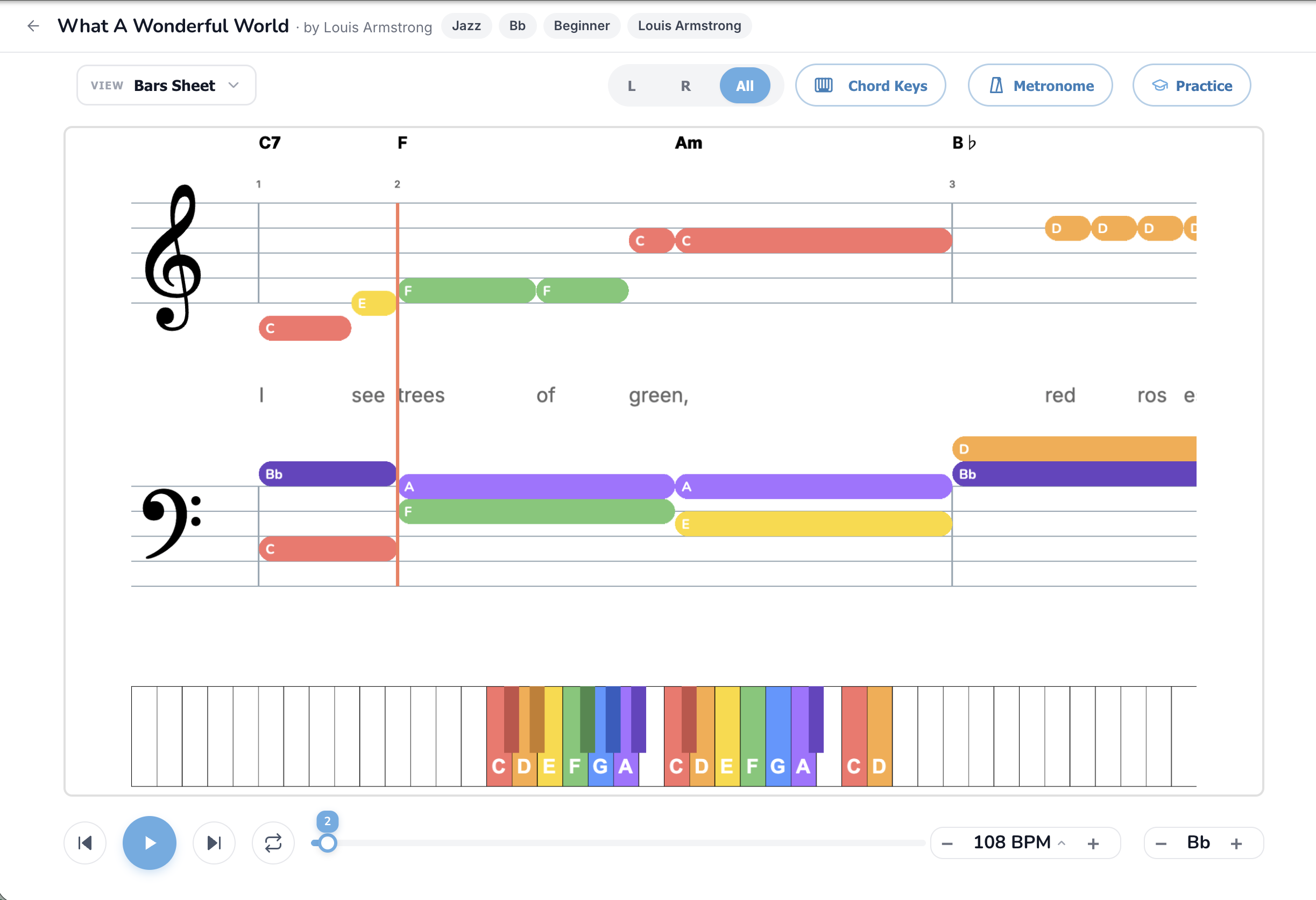
What you're actually looking at
Bars Sheet uses a simplified two-stave layout where every note is drawn as a horizontal colored bar instead of a traditional note head. The longer the bar, the longer you hold the note. A red vertical playhead sweeps left to right across the page, and you play each bar when the playhead touches its left edge.
Specifically:
The visual is sometimes called a "piano roll" view, and you'll see similar layouts in DAW software like Logic and Ableton. The difference is that Bars Sheet is built for learning, not producing, so the bars are big and chunky and the playhead never moves faster than you can react.
The full feature set, button by button
View dropdown
Bars Sheet is the most popular non-Beginner mode, partly because the A/B test routinely shows it has the highest engagement of any sheet-style mode. Switch into it from any other mode at any time.
L / R / All pill
The most useful pill in Bars Sheet mode. Click L to hide the right hand and drill just the bass line. Click R to hide the left hand and learn just the melody. Click All to combine. The standard learning order is: R only, then L only, then All.
Chord Keys toggle
The chord labels above the top stave are extra cheat-sheet material. They tell you the harmonic context of each bar, which is useful if you eventually want to play "by ear" or improvise. Keep them on while you're learning, turn them off once you don't need them.
Metronome
Bars Sheet has a built-in visual click already (the playhead is its own metronome), but adding an audible click on top reinforces the pulse. Useful when you're learning at slow tempos and the visual rhythm starts feeling loose.
Practice button
Practice mode pairs especially well with Bars Sheet because the bars literally turn green as you hit each note. Waiting mode pauses the playhead at each note until you press the right key, which makes Bars Sheet the friendliest mode for first-time MIDI practice. See How to Practice with Your Real Piano for setup.
BPM control
The fundamental practice tool. Drop the tempo to 50% on first pass, build up. The playhead slows down with the tempo so you have time to spot the next bar coming.
Song Key transposer
Useful if a song has dense black-key bars that you'd rather avoid. Bump up or down a few semitones until the colors lean toward the white keys.
Click-to-seek
Click anywhere on the bars to jump the playhead there. Use it to drill the chorus over and over without scrubbing through the verses every time.
How rhythm reads in Bars Sheet mode
Three principles:
Once you've internalized these three rules, Bars Sheet stops feeling like a visual aid and starts feeling like a complete notation system on its own. Many players never leave it.
How to actually practice in Bars Sheet mode
Common mistakes
Songs worth trying in Bars Sheet mode
Easy bars (slow tempo, fewer notes):
Medium bars (mid-tempo, more notes):
Stretch goals (rhythm-heavy):
When you've outgrown Bars Sheet
Bars Sheet is a place lots of players happily live forever. But if you want to push toward formal sheet music reading, the path is:
Or read the full mode comparison to see how Bars Sheet sits next to the other seven modes.
TL;DR
Bars Sheet replaces rhythm notation with bar lengths. Longer bar, longer note. Playhead scrubs left to right, you play each bar when the playhead touches it. Drill hands separately at 50% BPM, combine, ramp the tempo. The friendliest "real" notation system for adults who don't read sheet music yet. Start with the easy songs for fast wins.
Ready to start playing?
Put it into practice with thousands of color-coded, slow-down-able songs, free in your browser.