Sheet Music Mode: Real Engraved Piano Scores in Your Browser
Two-stave engraved notation rendered by Verovio. How to read it, when to use the color toggle, and how to practice sight-reading inside the player.
Sheet Music mode is the only mode in Super Simple Piano that looks exactly like a real piano score you'd buy at a music store. Every other mode is a learning aid. This one is the destination. Once you can read it, every song in every publisher's catalog opens up to you, not just the ones with simplified visualizers.
This is the deep-dive guide. For a 30-second overview alongside the other seven modes, see the player modes overview.
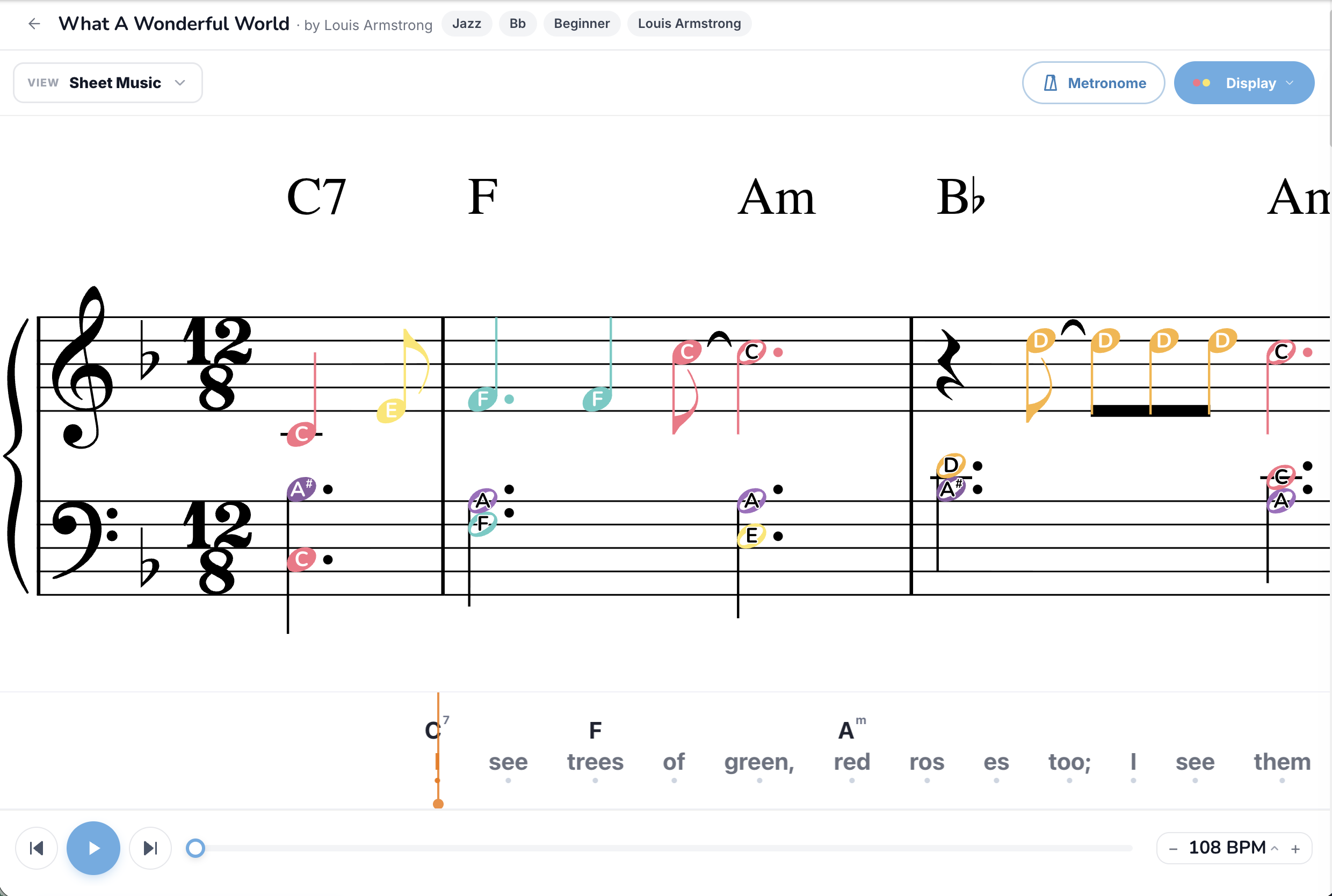
What you're actually looking at
A real grand-staff piano score, the same kind a piano teacher would put in front of you for a lesson. The notation is rendered server-side by Verovio, the same engraving engine used by major music publishers and digital libraries, so the typography, spacing, and beaming are publisher-grade. Every line, every space, every stem direction follows traditional music engraving rules.
Specifically you see:
The colored note heads are the bridge between Sheet Music mode and the rest of the player. Turn them off when you're ready to read a "real" score. Turn them on if you still want the visual scaffolding while you build reading speed.
The full feature set, button by button
View dropdown
Switch into Sheet Music from any other mode. The mode is sticky across songs, so once you commit to reading you can flip every song into Sheet Music view automatically.
Display button (top-right)
The Display button is the most important button in Sheet Music mode. It toggles between:
Most people start with colors on and turn them off once they're reading fluently. There's no right answer, some advanced players keep colors on permanently because they prefer the visual feedback.
Metronome
Essential in Sheet Music mode. Sight-reading without a steady click is how you build wobbly tempo habits. Always turn it on for first run-throughs.
Practice button
Live grading works in Sheet Music mode but is most useful in Performance mode (not Waiting mode) because the staff layout doesn't pause as cleanly as the bar-sheet layouts do. Connect a MIDI keyboard and the player flashes each note green or red as you hit it. Full setup in How to Practice with Your Real Piano.
BPM control
Set to 70-80% the first time through a new piece. This is the gold standard for sight-reading: slow enough that you have time to look ahead and decode the next bar before you reach it.
Song Key transposer
Transpose any score up or down. Tip: transposing is a great sight-reading exercise once you're fluent in the original key. Every transposition forces you to actually *read* the notes, not pattern-match the shape.
Auto-scroll and page turns
Sheet Music mode scrolls automatically as the song plays, no manual page turn. The current bar highlights as the playhead reaches it. Click anywhere in the score to jump the playhead to that beat.
Which songs have Sheet Music available
Sheet Music mode is only available on songs that have a publisher-quality MusicXML source uploaded. Most catalog songs do. Songs converted from YouTube videos and songs uploaded by users typically don't, because YouTube-derived MIDI lacks the structural data needed to engrave a clean score, and user uploads usually come from MIDI exports that strip out the engraving instructions.
If Sheet Music isn't in the View dropdown for a particular song, that's why. Try a different arrangement or a different song.
How to actually practice in Sheet Music mode
The classical-music way of practicing is the right way here:
Sight-reading inside Sheet Music mode
Sheet Music mode is one of the cheapest sight-reading practice tools available online. The recipe:
Repeat with a new song every day. Twenty minutes a day of cold sight-reading at 70% will visibly change your reading speed in two weeks.
Common mistakes
Songs worth trying in Sheet Music mode
Sorted by approximate reading difficulty:
Easier reads:
Intermediate:
Stretch goals:
Cross-modal practice
A workflow lots of players use:
TL;DR
Sheet Music mode is the real thing: two-stave engraved notation, dynamics, articulations, the works, rendered server-side by Verovio. Toggle colored note heads on for training, off for the real reading experience. Practice with hands separate, slow tempo, metronome on, and graduate from 70% sight-reading to 100% over months, not days. Read the full mode comparison or jump back to the easier modes if Sheet Music is too much.
Ready to start playing?
Put it into practice with thousands of color-coded, slow-down-able songs, free in your browser.