Lead Sheet Mode: The Singer-Pianist's Best Friend
Lyrics, melody note dots, and chord symbols on one page. The exact format working pop musicians use, with the melody guides every singer wishes fake books had.
Lead Sheet mode is the format every working pop musician already uses. Open any fake book, any Real Book, any "[song name] chords" page on the internet, and what you see is a lead sheet: lyrics, chords above (or below) the words, and maybe a hint of the melody. It's how singers, accompanists, jam-session pianists, and gigging musicians actually communicate songs to each other.
Super Simple Piano's Lead Sheet mode adds one thing that fake books almost never have: colored melody-note dots above each lyric. That single addition turns a chord chart into a complete song reference. You can play the melody and sing along, or just play the chords and sing, or both.
For an overview of all eight modes, see the player modes overview.
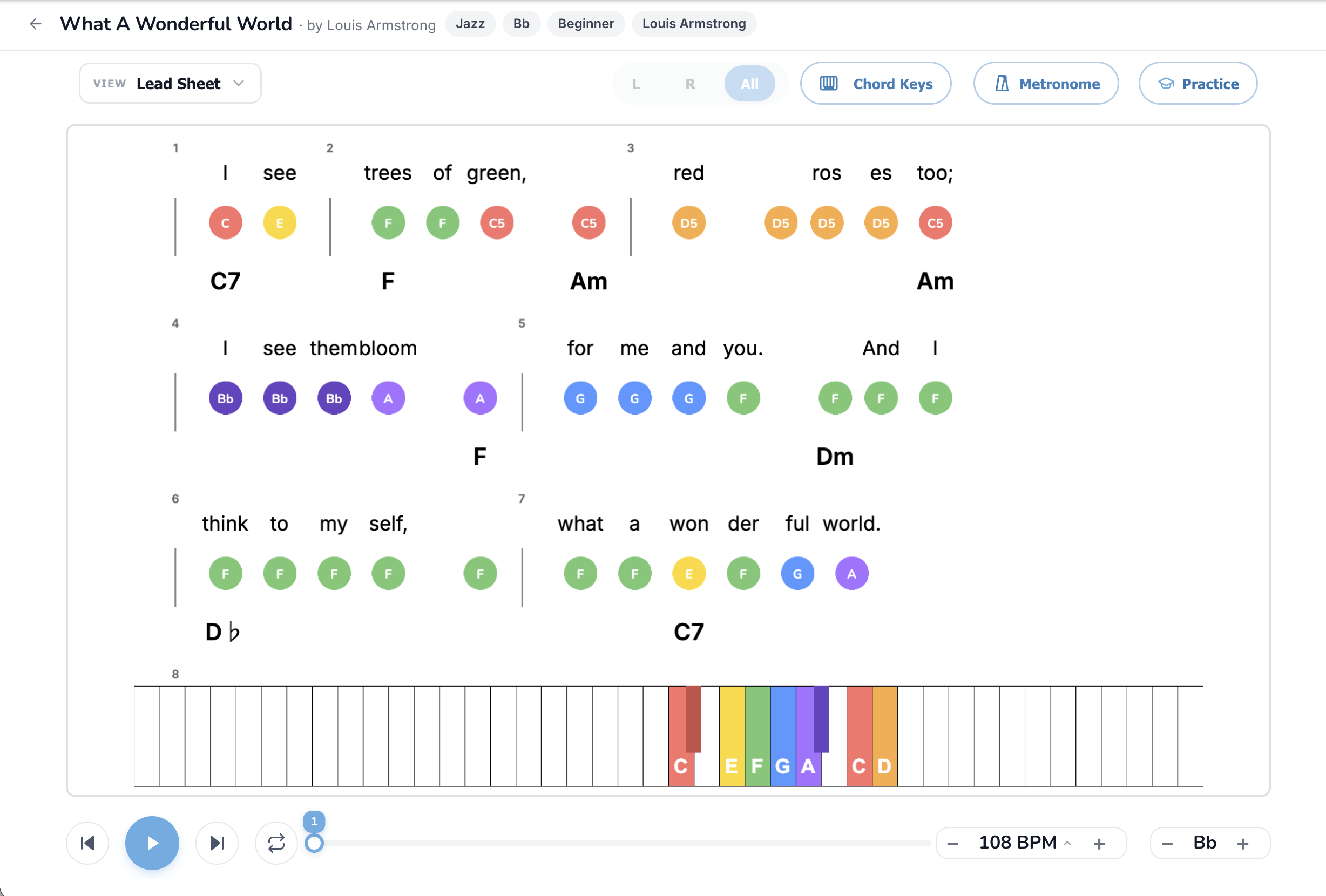
What you're actually looking at
Lead Sheet is the most lyric-centric of all the modes. The visual hierarchy goes:
There's no staff. There's no rhythm notation. There are no bar lines visible by default. It's a song reduced to the three things a singer-pianist actually needs: what to sing, what melody note that is, and what chord to vamp.
Why Lead Sheet exists
In the working music world, lead sheets are the universal currency. A jazz pianist accompanying a singer at a corner-bar gig uses a lead sheet. A church pianist accompanying a soloist uses a lead sheet. A producer recording a vocalist in a studio uses a lead sheet. A wedding band passing songs to a sub for the night uses a lead sheet.
The reason is that lead sheets pack the maximum information in the minimum space. One page of lead sheet can cover a song that would take six pages of full piano notation. You don't need every note written out, you need the *structure*, and you fill in the texture in real time with your hands and your ear.
The full feature set, button by button
View dropdown
Lead Sheet is the default mode for vocalists and the obvious choice for any song you want to sing along to. Switch in and out from any other mode.
L / R / All pill
Cosmetic in Lead Sheet, no traditional left-hand notation to hide. Stay on All.
Chord Keys toggle
The chord labels ARE the mode. You can't really turn this off meaningfully, but if you do, you're left with just lyrics and melody dots which is closer to a karaoke screen than a lead sheet.
Metronome
Useful for solo practice, less useful when you're singing with the player playing along (it'll click over the audio).
Practice button
Practice mode works in Lead Sheet but is less essential than in note-reading modes, because you're using Lead Sheet to *accompany singing*, not to drill notes. Still useful if you want to verify you're playing the melody dots correctly.
BPM control
Singers will use this constantly. A song that's pitched right but feels too fast for your phrasing? Drop to 90%. A song that drags? Push to 105%.
Song Key transposer (the killer feature for singers)
This is the most-used button in Lead Sheet mode. Bump the song up or down in semitones until the melody sits where your voice is most comfortable. Most singers find their songs land in a 3-semitone window of the original key, give or take.
Click-to-seek
Click any chord symbol or lyric to jump the playhead there. Useful for drilling tricky transitions.
How to use Lead Sheet for singing along
The workflow for a singer-pianist:
Comping patterns to graduate to
Lead Sheet doesn't tell you *how* to play the chords, just *what* chords to play. Once you're comfortable, try these left-hand patterns:
You don't need to know all of these on day one. Start with block chords, graduate to bass + chord, then experiment.
Common mistakes
Songs worth trying in Lead Sheet mode
Easy chord changes:
Medium chord changes:
Stretch goals:
For songs explicitly designed for piano accompaniment of singers, see the piano accompaniment library.
When Lead Sheet is the wrong mode
Lead Sheet is built for songs you want to sing. If you want to play piano as an instrument with the melody in your hands and the chords supporting it, Simple Sheet mode or Sheet Music mode are better fits. Lead Sheet is also less useful for instrumental piano pieces (Beethoven, Debussy, soundtrack music), where the "lead sheet" abstraction loses too much information.
TL;DR
Lead Sheet is the singer-pianist's mode: lyrics, melody dots above each syllable, chord symbols below. Transpose the song first to fit your voice. Vamp chord roots in your left hand, sing the lyrics, optionally play the melody. Graduate to fuller comping patterns as your hands get comfortable. Read the full mode comparison for context or browse the piano accompaniment library for songs built for vocalists.
Ready to start playing?
Put it into practice with thousands of color-coded, slow-down-able songs, free in your browser.