Fall Down Mode: Synthesia-Style Falling Notes for Visual Learners
The YouTube piano cover style brought into a real practice tool. How Fall Down mode works, why it sticks with self-taught players, and how to pair it with practice mode.
If you've ever watched a YouTube piano cover with colored notes raining down onto a keyboard, you already know Fall Down mode. It's the format that turned millions of people into self-taught pianists, and it's the format that gets unfairly dismissed by traditional piano teachers despite working incredibly well for the people who learn from it.
Super Simple Piano's Fall Down mode is the same visual format you know from YouTube tutorials, but built into a full practice tool with tempo control, key transposition, hand isolation, lyric display, and live grading via MIDI keyboard or microphone. It's not just "watch and copy", it's a real practice surface.
For an overview of all eight modes side by side, read the player modes overview.
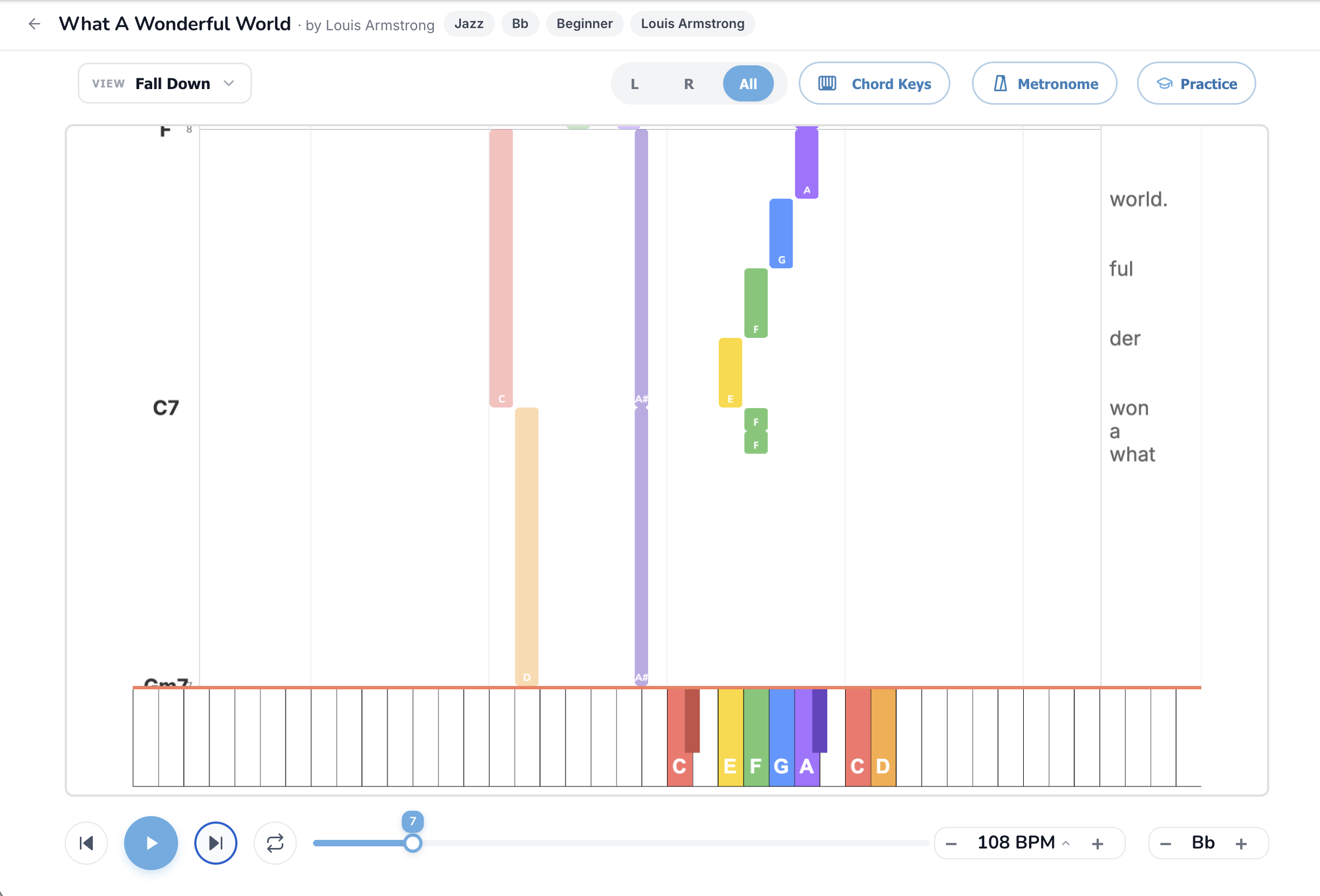
What you're actually looking at
Colored bars fall vertically from the top of the screen toward an on-screen keyboard at the bottom. When a bar touches a key on the keyboard, that's when you play that key. The length of the bar is how long you hold the note. Different colors represent different notes (the same color system used everywhere else in the player).
Around the falling notes you'll also see:
The visual is sometimes called "Synthesia" after the popular Windows app that pioneered the style, or just "piano roll" in DAW software. The principle is the same: vertical time, horizontal pitch.
Why Fall Down mode works so well for self-taught players
Three reasons:
The full feature set, button by button
View dropdown
Fall Down is the favourite mode of visual learners and anyone who's spent significant time learning from YouTube piano tutorials. Switch into it from any mode.
L / R / All pill
Critical for Fall Down. The screen can get crowded with both hands' bars falling at once. Click R to learn the melody alone, L to learn the bass alone, then All to combine. Don't skip the hands-separate step.
Chord Keys
Chord symbols appear on the left edge of the screen. Useful if you want to play left-hand chords from the symbol rather than from the falling bass bars.
Metronome
Less useful in Fall Down than in other modes because the falling bars are themselves a visual click. Add the audible metronome only if you're losing the pulse.
Practice button
Pairs especially well with Fall Down. Waiting mode pauses the falling bars at each note until you press the correct key. Performance mode grades you as the bars fall, with each note flashing green or red. See How to Practice with Your Real Piano for the setup walkthrough.
BPM control
The most-used button in Fall Down. The default speed is the song's real speed, which is often too fast for first-time reading. Drop to 50% on first pass, build to 70%, then 100%.
Song Key transposer
Useful if a song has bars landing on awkward black keys that you don't want to learn yet. Transpose to a different key and the bars shift to easier positions.
Click-to-seek
Click anywhere on the falling notes area to jump the playhead. Use it to drill specific sections.
How to actually practice in Fall Down mode
Common mistakes
Songs worth trying in Fall Down mode
Easier songs (fewer notes, slower):
Medium (more notes, mid-tempo):
Stretch goals (showpieces):
When Fall Down isn't the right mode
Fall Down is amazing for learning a specific song fast. It's less amazing for building general musicianship. If you stay in Fall Down mode exclusively, you'll learn songs but not *piano*, and the songs you learn won't transfer to other songs because you're memorizing visual patterns rather than musical structure.
The fix is to alternate. Learn a new song in Fall Down mode for fast wins, then play the same song in Bars Sheet mode or Lead Sheet mode to start seeing the musical structure underneath. After a year of mixed practice, try Sheet Music mode to read a score cold.
Read the full mode comparison for the wide-angle view of how all eight modes complement each other.
TL;DR
Fall Down mode is the Synthesia-style falling notes format every YouTube piano tutorial uses, built into a real practice tool with tempo control, hand isolation, key transposition, and live MIDI grading. Watch first, drill hands separately at 50% BPM, combine, ramp the tempo. Pair with Practice mode + Waiting for the fastest possible learning loop. Start with easy songs and don't skip the slow tempo work.
Ready to start playing?
Put it into practice with thousands of color-coded, slow-down-able songs, free in your browser.